17 Sep 2026
|6 min
Running research sessions with AI
Wondering what AI can do once a research session is underway? See where it can genuinely help during user interviews and usability tests, and where it still falls short.

Whether you're running a live user interview or an unmoderated usability test, what AI can do looks completely different.
Research happens in one of two basic modes: moderated, where someone – a person or an AI – has a live conversation with a participant, and unmoderated, where a participant works through a test alone, with no moderator present. You'll have already decided which one before the session starts – what changes here is what AI can actually do during that session.
In a moderated study, AI can run the interview itself. In unmoderated studies, it can step in with a follow-up question when there's no moderator to ask one. Either way, automatic transcription has quietly become the default way researchers capture sessions, replacing manual note-taking.
AI-simulated participants are a different approach again – they remove the live session altogether. See Recruiting participants with AI for the full picture.
Key takeaways
Research happens in two modes – moderated (a live conversation) and unmoderated (no moderator present) – and AI's role looks different in each.
In moderated sessions, AI's main role is running the interview itself when there's no human moderator involved at all.
In unmoderated studies, some research tools – including Lyssna – can generate real-time follow-up questions when a long-text answer lacks detail, standing in for the natural follow-up a moderator would otherwise ask.
Automatic transcription works across both modes and has become the default way most researchers capture moderated and unmoderated recorded sessions, freeing them from manual note-taking.
AI-simulated participants remove the live session altogether, in either mode.

What role does AI actually play once a research session is underway?
In moderated research, a human or an AI has a live conversation with the participant. In unmoderated research, the participant works through a test on their own, with no moderator present at all. What AI can do depends on which one you're running – here's the at-a-glance version before the sections below unpack each row.

Info tip: Lyssna's MCP server is built for querying your research history – your studies, your existing data – not for moderating or joining a live session. If you're looking for how AI fits in before a session starts, see the chapter on Planning your research with AI.
AI-moderated user interviews
Mode: Moderated
Some research platforms now let AI conduct an entire research interview or usability session with a real participant – asking the questions, following up, and adapting in real time, without a human moderator present.
The benefits are practical: it's available in any time zone and in multiple languages, it can run many interviews in parallel, and it delivers questions with perfect consistency across every participant. A Verasight study found AI interviews produced nearly five times more words per response than written open-ends, with 80% of that added depth coming from the AI's follow-up probing.
The downsides are worth weighing just as carefully. An AI moderator is less able to build rapport or read non-verbal cues. Completion rates can suffer too – the same study found only 40% of participants finished an AI-moderated interview, versus 99% for a written survey. And that drop-off wasn't random: it skewed toward certain demographics, a real representativeness risk for anyone treating the results as reflecting a general population.

Read more: For named platforms offering AI-moderated interviews, see AI UX research tools.
Automatic transcription
Mode: Moderated and unmoderated
This capability spans both moderated and unmoderated research.
Many research tools now automatically transcribe recorded interviews and usability tests as part of the recording itself, turning audio and video into searchable, timestamped text with no manual transcription work. In Lyssna, you can transcribe user interviews and test recordings in any language.
That frees you to stay present with the participant instead of splitting your attention on note-taking. It solves the same divided-attention problem that comes up whenever you're trying to run a session and capture it at the same time. A synchronized, clickable transcript also makes it fast to jump back to the exact moment something was said, and it creates a verbatim record instead of paraphrased notes.
A few things are worth watching for. Automatic transcription accuracy varies with audio quality, accents, and background noise, so it's worth a spot-check before quoting a participant verbatim. A transcript is still raw data, not a finished set of findings – turning it into actual insights is covered in the Analyzing and synthesizing with AI and Making your research reusable with AI chapters. And recording someone requires their consent, which is worth confirming upfront rather than assuming – see the UX screener questions guide's note on confirming consent to recording as part of a screener.

What else can AI surface during a research session?
AI can also pick up on narrower signals during a session – prompting for more detail when an answer falls short, or flagging how a participant seems to be responding as they go.
Auto-generated follow-up questions
Mode: Unmoderated
This is the clearest example here of an AI capability that exists specifically because no moderator is present to ask a natural follow-up.
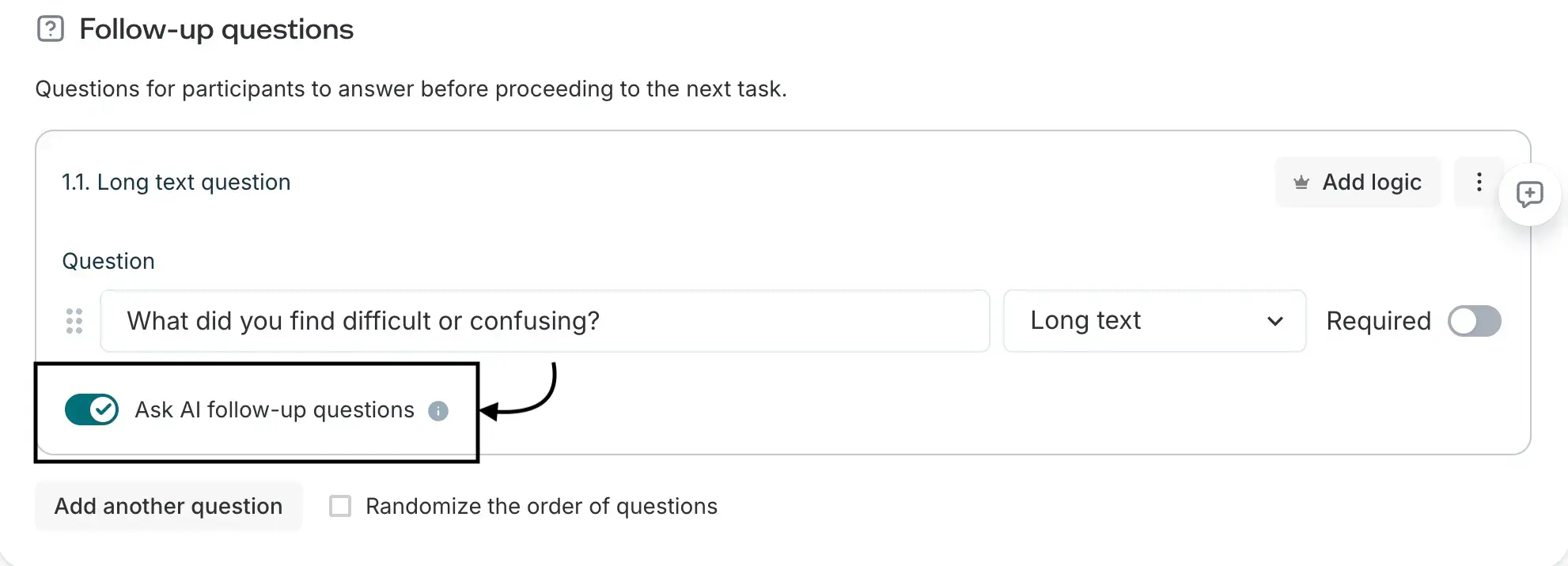
Some tools, like Lyssna, can automatically generate AI follow-up questions the moment a long-text answer lacks detail, prompting the participant to elaborate before they move on, with no moderator present at all.
That gets you deeper qualitative data from unmoderated studies, catching a vague answer immediately instead of realizing too late during analysis that a question needed a follow-up. A generated follow-up can occasionally feel generic or miss context a human would have caught, though, so it's worth reviewing responses rather than assuming every follow-up added real depth.
Engagement and sentiment signals
Mode: Moderated and unmoderated
This smaller category of tools uses AI to flag signs of participant confusion, hesitation, or frustration in real time, drawn from response patterns, tone, or – in some cases – facial expression.
It's a genuinely niche capability rather than a mainstream one: most usability testing platforms don't offer these features (at least not yet), and the closest mainstream equivalent – AI sentiment tagging applied to a transcript after the session – is a narrower, less real-time thing. That gap could close as emotion-detection tools mature, though, so it's worth knowing the category exists, even if you won't run into this in most research platforms today.
This is also a more ethically loaded capability than the others covered here. Facial and tone analysis carries bias and consent considerations, and a flagged "frustration" signal is a prompt to look closer, not a verified fact about how someone felt.
Do AI-simulated participants replace a live session?
Mode: Replaces unmoderated (and stands in loosely for moderated)
Synthetic participants are built primarily to replace an unmoderated test – generating responses to a script or survey across many personas at once, without a live session at all.
Some tools also let you chat with a synthetic persona afterward to follow up on what it said, which gets closer to a moderated feel, but it's not the same as a live user interview built around real-time judgment calls.

How Lyssna can help
Lyssna's AI follow-up questions and Recordings features (part of the broader approach described in AI at Lyssna) both apply at the session stage, in different modes:
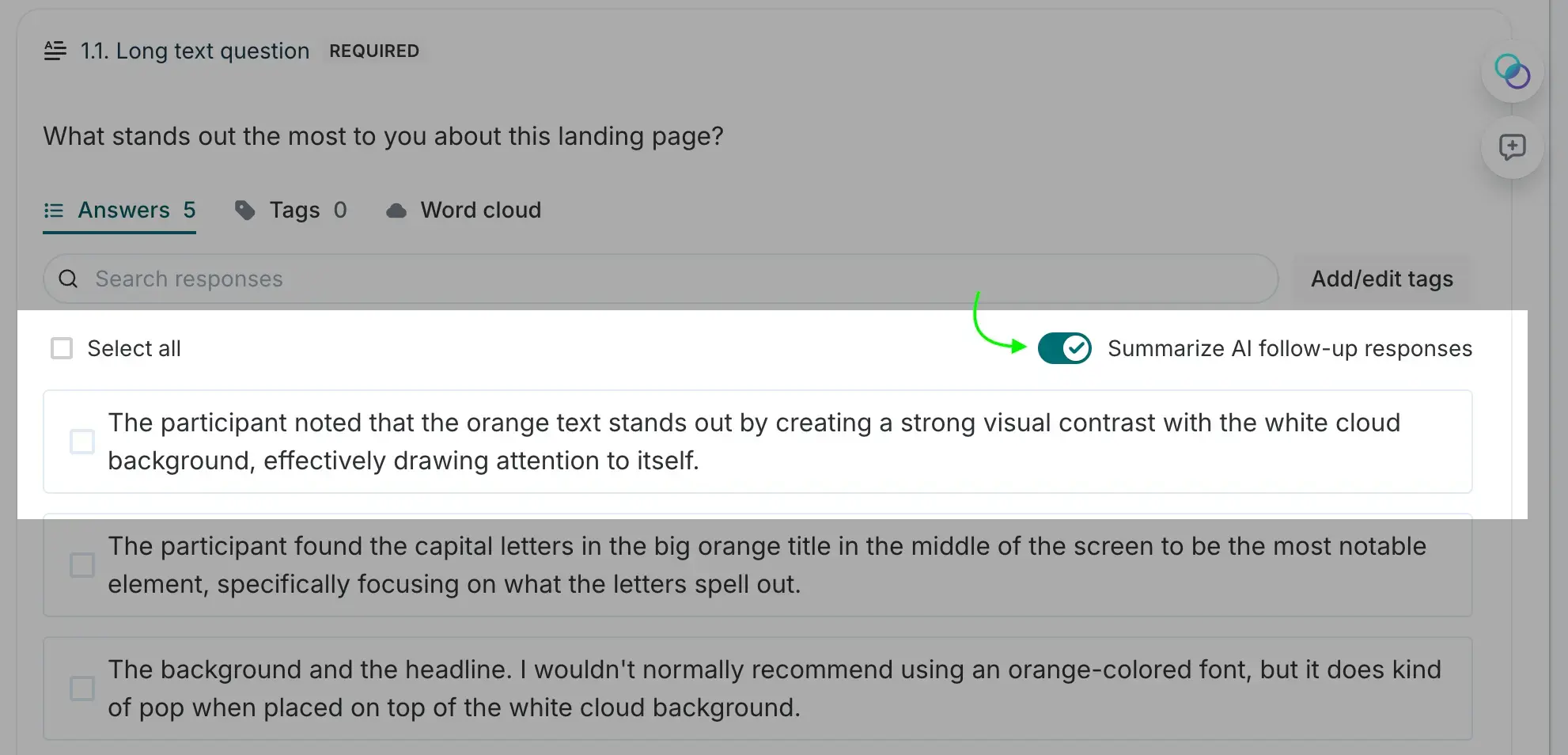
AI follow-up questions: Toggle it on per question, and Lyssna assesses each response as it comes in – the number of follow-ups isn't configurable, it's determined by response quality, up to a maximum of two. You can review follow-up responses individually, or combine them into one AI-generated summary using "Summarize AI follow-up responses." Follow-up answers are included in CSV exports alongside the original response.
Recordings and automatic transcription: Recordings transcripts are synced to the video, so you can click a word to jump to that moment, and they're downloadable individually or in bulk, plus included in CSV exports.
Lyssna doesn't offer full AI-moderated interviews, though our Interviews feature supports your own human-moderated sessions with recording and transcription built in.
FAQs about running research sessions with AI
Moderated research is a live conversation, whether a human or an AI is leading it. Unmoderated research is a participant working through a test on their own, with no moderator present at all. AI's role looks different in each: it can run or support the conversation in moderated research, and it can generate a real-time follow-up question in unmoderated research when there's no moderator to ask one.
Yes, some research platforms let AI run a full interview with a real participant, asking questions and following up in real time. It's consistent and available at any hour, but it's less able to build rapport or read non-verbal cues than a skilled human moderator, and participants should be told they're talking to an AI.
They're a way for a tool to prompt a participant to elaborate the moment an answer lacks detail, standing in for the follow-up a moderator would otherwise ask. In Lyssna, this applies to long-text questions and can generate up to two follow-ups per response, depending on how specific the original answer was.
No. AI-simulated participants replace the live session altogether, moderated or unmoderated, with an AI-generated stand-in for a real person. Running a session with AI still involves a real participant – AI just plays a different role depending on the mode. Synthetic participants are covered separately in Recruiting research participants with AI.