17 Sep 2026
|7 min
Analyzing and synthesizing research with AI
See a suggested workflow for using AI to analyze and synthesize research faster, without losing rigor.

Analyzing and synthesizing research with AI involves using it to summarize, categorize, and query what you've already collected – turning raw responses into findings faster, without skipping the judgment calls that make a finding trustworthy.
Every study ends the same way: a transcript, a spreadsheet of open-text responses, or a stack of recorded sessions, and hours of analysis still ahead of you. Manual work is the single biggest frustration researchers report at this stage, cited by 60.3% of practitioners – and it's concentrated in two specific tasks: reading through everything you collected (59.0%) and organizing what you find into some kind of structure (57.3%), according to Lyssna's Research Synthesis Report 2025 (a survey of 300 UX researchers, designers, and product managers). That's before you've written a single recommendation. It’s still the biggest bottleneck a year on: manual synthesis or write-up was the most common slowdown after a study wraps up (32%) in our 2026 survey of product teams using AI for research.
It's no surprise, then, that analysis and synthesis is the stage of research where AI has been adopted the most. According to the same report, AI-assisted analysis – tied with team debriefs – is the single most common way research actually gets synthesized. If you've ever pasted a transcript into ChatGPT or Claude and asked it to summarize what's there, you're already doing this.
Whether you're working through a single usability test or a batch of interviews from a longer study, this stage picks up once you already have something to work with. How that material gets created in the first place, including automatic transcription, is covered in full in Running research sessions with AI, so it isn't repeated here. What follows is a five-step workflow for turning that raw material into findings, and then insights, with AI assistance at every step.
Key takeaways
Analysis and synthesis is where AI has been adopted the most in research work – many practitioners already use it as part of their workflow.
A lot of that work happens in general-purpose tools like ChatGPT and Claude, rather than specialized research software.
An AI assistant connected to your research tool via MCP can query across every study you've run, and ground its answers in what participants actually said.
Every AI output in analysis is a strong first draft, not a finished finding – it still needs your judgment.
Lyssna's Synthesize feature and MCP server cover different parts of this AI workflow.

A five-step AI analysis and synthesis workflow
Turning raw research into findings with AI can be broken down into five key steps: summarize, tag and code themes, query and compare across studies, extract the evidence, and build the narrative. Raw data and transcriptions – turning recorded sessions into text in the first place – is the necessary input to this workflow, not a step in it. If you're starting from an untranscribed recording, Running research sessions with AI covers that in full.
Some of this workflow can be done in a general-purpose assistant like ChatGPT or Claude, and some of it plays into features built specifically in your UX research tool. Here's the rundown.
1. Summarize
Turning a transcript or a batch of responses into a first-pass digest of what was said is a common AI use case in research synthesis. It's usually the first thing people try, and it's also the easiest to trust, since a summary is easy to check against the source material.
The general-assistant version of this is straightforward: upload a CSV, or paste transcripts or responses into ChatGPT or Claude (or your tool of choice), and ask for a summary.
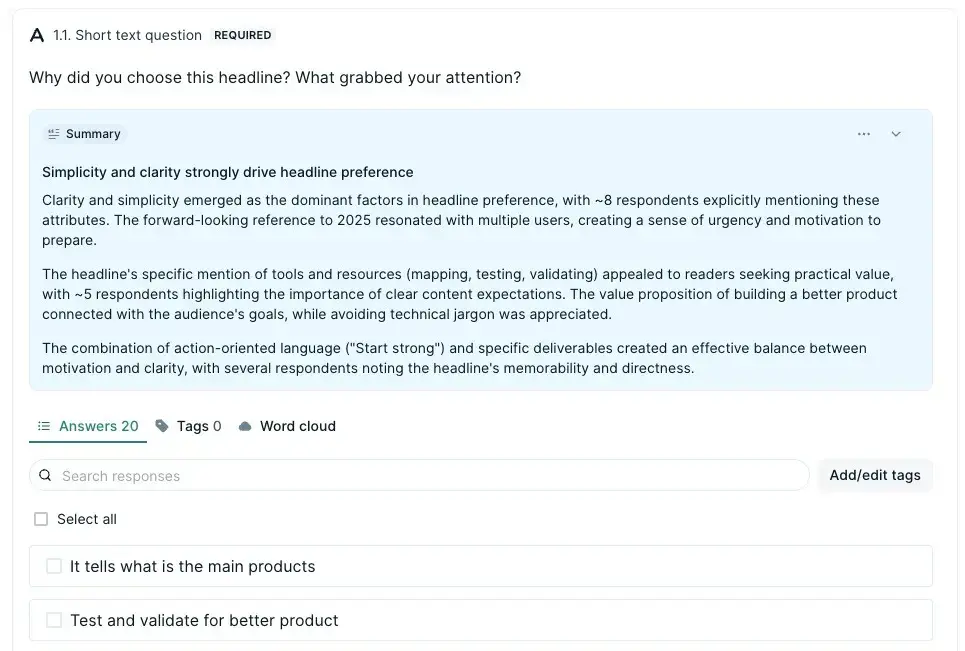
In Lyssna, the Synthesize feature does the same job from inside your results – it generates an AI summary for any question type, not just long-text, directly from the responses you've collected. You can edit the summary afterward, regenerate it for an alternative version, and leave thumbs up or down feedback.
2. Tag and code themes
Turning raw responses into labeled categories is where a lot of the real synthesis effort has traditionally gone – and it's a distinct job from summarizing. A summary tells you what was said; a coding scheme lets you count how often, and by whom.
AI is a useful starting point here: ask an assistant to propose a first-pass coding scheme or theme list from a batch of pasted responses, and you'll usually get something reasonable to react to and adjust. What it can't doat least in Lyssna, is apply that scheme for you – text tagging here is manual. You apply tags to responses individually or in bulk, then view tag counts and filter by tag to see who said what. AI is a fast way to draft the coding scheme; tagging is how you turn it into structured, filterable data.

Further reading: Tagging and coding themes is a form of thematic analysis – see Thematic analysis for the full method this step draw on.
3. Query and compare across studies
If your question only concerns one study, you can skip this step. But if you're working across multiple studies, instead of reopening them one at a time, you can connect your research tool to the AI assistant you already use and ask a question across all of them at once – including interviews, usability tests, and surveys.
This kind of connection is called MCP (Model Context Protocol), and it's what lets an AI assistant reach directly into your research tool instead of you copying and pasting data back and forth. For example, you could ask something like "What have participants told us about onboarding across the last four studies?" and get an answer pulled from real response data, without reopening a single study yourself.

Skill spotlight: Lyssna's Ask Your Research Anything skill answers a question against everything you've already researched, and flags what raw AI output usually leaves out – stale evidence, sample size, and contradictions between studies.

4. Extract the evidence
Once you know which recommendation or finding you're building a case for, you need the specific quotes or data points that back it up – without manually re-reading every transcript to find them.
The same MCP connection does the legwork here: ask something like "Pull every quote from the onboarding studies where participants mentioned confusion during signup" and get speaker-attributed quotes straight from the source, instead of skimming a stack of transcripts yourself. Interviews are part of the queryable material here, alongside usability tests and surveys, so a quote from a recorded conversation is just as reachable as a completion rate from a survey response.
That said, a pulled quote or data point is still worth checking against its original source before it goes in front of a stakeholder. An AI assistant can misquote or paraphrase something as if it were verbatim, even when it's pulling from your real data. And even a genuinely verbatim line can mean something slightly different in the conversation it came from, the same way a number is only as good as the raw responses it was calculated from.

Pro tip: Before you put an AI-extracted quote in a deck, open the source and read the sentence before and after it. It takes a minute, and it's often where the real nuance lives – a qualifier, a joke, or a "but" that flips the meaning of the line on its own. It also means you won't get caught out if a stakeholder asks "what did they say right before that?"
5. Build the narrative
Turning coded findings and supporting quotes into a coherent narrative – not just a pile of labeled data – is the last step, and it's kept deliberately brief here. The Reporting and decision-making with AI chapter picks up from here in full detail, so treat this step as a preview rather than the complete picture.

What are the limits of AI-assisted analysis?
As we discovered in our Research Synthesis Report, researchers’ trust in AI drops as tasks require more interpretation, from 82.9% for summarizing down to 25.6% for visualization.
Every AI output in analysis still needs human validation. A summary or a proposed theme is a strong first draft, but it isn’t an insight, and treating it as anything more is where mistakes tend to start. As Tristan Gamilis, CPO and co-founder at Lyssna, put it: "When AI tools do the synthesis of user research, the hard work shifts to interrogating the output, which takes real care when everything AI produces looks plausible. The real skill is knowing what your evidence actually supports, and staying honest about what it can and can't tell you."
AI can surface a pattern; it can't tell you which pattern actually matters to your product or business decision. That judgment call – what's worth acting on, and which is interesting but beside the point – stays with you.
Further reading: For more on where AI helps and where it needs a human check, see Claude for user research and ChatGPT for user research.
How Lyssna can help
AI synthesis, along with the Lyssna MCP server, cover different parts of this workflow:
Synthesize turns raw responses into an AI summary for any question type directly in your Lyssna studies – as Lyssna customer Michelle J. put it: "The AI 'summary generation' for open text field questions is a time saver of note!"
The MCP server connects the AI assistant you already use to your research history, so you can query across studies and pull attributed evidence without leaving the tool you're already in.
Between them, they cover the start and the middle of this workflow – turning raw responses into a first-pass summary, and pulling grounded evidence once you know what you're building a case for.
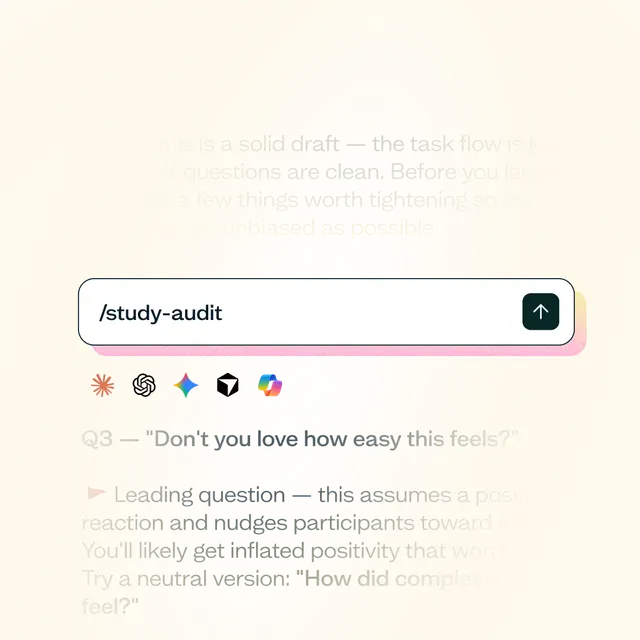
Skill spotlight: Lyssna's Synthesize Research skill turns raw study results into a full synthesis (themes, breakdowns, tensions between metrics), without you needing to know or state why the study was run.
FAQs about analyzing and synthesizing research with AI
A five-step workflow covers most of what people actually do: summarize your raw responses or transcripts, tag and code the themes that come out of them, query and compare across multiple studies (if needed), extract specific quotes or data points to support a finding, and build those pieces into a narrative. AI can help at every step, but the amount of oversight you need increases as the task gets more interpretive.
AI can propose a first-pass coding scheme or theme list from a batch of responses, which is a useful starting point. It can't tell you which theme actually matters to your product or business decision – that judgment call stays with you.
Yes, if the AI assistant is connected to your research history through something like an MCP server. Instead of reopening each study individually, you can ask a single question and get an answer drawn from every study you've run, including interviews, grounded in what participants actually said.
Most AI-assisted synthesis happens in general-purpose assistants like ChatGPT and Claude, not dedicated research software. Specialized tools add the most value once you connect them to your own study data, for tasks like cross-study querying that a general assistant can't do on its own.
Treat it as a strong starting point, not a final answer. A pulled quote is useful, but check it against its original context before it goes in front of a stakeholder – verbatim doesn't always mean representative.