17 Sep 2026
|7 min
Planning your research with AI
Wondering how AI fits into planning your next study? See what it can help with – research questions, guides, screeners – and where it still falls short.

For most teams, planning research with AI comes down to using general-purpose assistants like ChatGPT and Claude as a copilot for the thinking you'd otherwise do alone: drafting research questions, discussion guides, and screener logic.
At the start of a study, you know roughly what you need to find out, but the goals are still fuzzy. There's no discussion guide yet, and the screener logic that'll keep the wrong participants out hasn't been written – and this is all before you've talked to a single person. It's the part of research that happens before the "real" research starts, and it's easy to lose time on it.
This is where AI assistants have become part of a lot of researchers' planning process, as a thinking partner you bring your half-formed ideas to. In our survey of 428 product people at Future Product Days 2026, 62% said an AI assistant like Claude or ChatGPT is part of their research-to-decision process. Whether you're scoping a single usability test or a broader market research project, the pattern is the same: you still decide what's worth researching and how, but you don't have to do all the first-draft thinking by yourself.
Used well, AI gets you from a blank page to a working draft quickly. Used carelessly, it produces confident-sounding filler you'll end up rewriting anyway – and the difference between the two comes down to how you prompt it, and knowing exactly where its limits sit.
Key takeaways
AI is most useful early in planning for drafting, not deciding – you still own the research questions, method choice, and final guide.
General AI assistants like ChatGPT and Claude can do most of the AI-assisted planning work researchers rely on.
Specific prompts beat vague ones – naming your goal, audience, and exact output cuts down on editing later.
A useful trick: ask AI to interview you about your study before you finalize it, so it surfaces gaps instead of just producing a draft.
AI can't tell you whether a question actually works until you test it with real participants.
Lyssna's templates and guides give you a solid starting point to hand to AI, then a real participant panel to recruit from.
What does planning research with AI actually look like?
Planning research with AI mostly involves opening a general-purpose assistant and using it to draft and think out loud – it's a copilot for the planning stage, not a replacement for the person doing the planning.
Planning is one of the places AI shows up first in a research workflow, because it's mostly drafting work – research questions, discussion guides, screener logic – and drafting is exactly what a general assistant is good at.
It's worth separating this from AI at the analysis stage, which is a different job entirely. Planning is about deciding what to study and how to ask about it; analysis is about making sense of data you've already collected. If you're looking for how AI fits into synthesis and reporting once the sessions are done, that's a separate part of this guide. This page stays tool-agnostic and focuses on the planning work itself.

Further reading: For tool-specific detail on using Claude or ChatGPT day to day, see Claude for user research and ChatGPT for user research.

What can AI help with when you're planning a study?
Defining your research goals and questions
AI is good at helping you turn a vague research question into something more specific and measurable. Hand it something like "find out why signups are dropping" and a decent assistant will push back with follow-up questions and return answerable research questions you can react to – tightening what you meant, rather than deciding it for you.
Choosing the right research method
Describe your goal, your constraints, and what you already know, and AI can suggest a method – a usability test, a survey, a round of interviews – along with its reasoning. Treat the suggestion as a starting point to validate against your own judgment. After all, it doesn't know your team's history with a method, or expectations from your stakeholders.
Drafting discussion guides and interview scripts
Given a description of your goals and your audience, AI can produce a solid first-draft discussion guide or interview script – with questions in a logical order, and follow-up prompts included. It's a genuinely useful starting point that saves you from staring at an empty document, but it still needs your edit pass before a participant sees it.
Writing screener questions
AI can draft screening logic to react to and tighten, the same way it can draft a discussion guide. But it's worth bearing in mind that screener questions carry a specific risk: leading or biased phrasing can quietly recruit the wrong participants. That risk is exactly why AI needs a human check here rather than a straight copy-paste.

Pro tip: Read each screener question as a participant would, and check whether the wording gives away which answer gets them into the study. If it does, rewrite it before it goes live.
As UX research consultant Nikki Anderson put it, on trusting her own expertise over AI: "I feel very fortunate that I … became an expert in what I did before this came along because I know what good looks like … for me I don't need AI to write a screener. I don't need AI to write a research plan."
Her point is that recognizing what a good screener question, or good research plan, looks like helps her validate a draft generated with AI instead of trusting it by default – and this is a skill worth building, whether you're using AI or not.
Getting oriented in an unfamiliar topic or audience
Before you write a single research question, AI can do useful desk-research groundwork on an unfamiliar audience or topic area. Walking in with that context makes your eventual questions sharper and less likely to ask something the team already knew.

How do you get useful results from AI when planning research?
The quality of what AI gives you back is mostly a function of what you put in. A few habits make a real difference.
Be specific, not vague
Vague prompts get vague, generic output that needs heavy editing. Specific prompts get something close to usable on the first try. Compare:
The pattern here is worth highlighting: goal, audience, the specific feature or flow, and the exact output you want. The more context you include in a prompt, the less editing the output needs afterward.
Give it real context and source material
Paste in or reference your actual personas, past research reports, research plans from previous studies, or product screens instead of describing them from memory. Ask the assistant to flag when it's guessing versus working from what you gave it. The difference between a generic draft and a useful one is almost always how much real context it had to work with, not how cleverly you phrased the request.
Where you can, connect the assistant to the live version of your source material instead of a static copy. At Lyssna, for example, we use Claude skills that pull directly from our own Notion workspace, so the assistant is always working from what's actually current, not a stale copy from three months ago.
Ask it to interview you
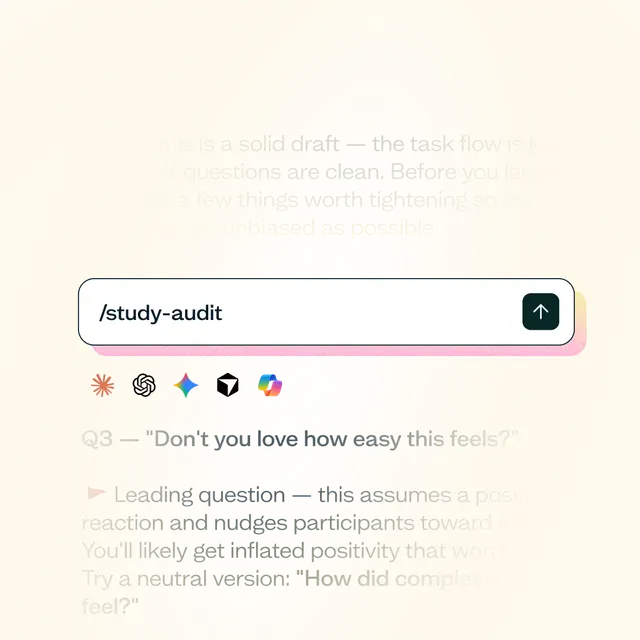
Flip the usual direction: instead of only asking AI to produce something, get it to ask you questions first. It's a concrete, repeatable way to catch missing assumptions, an unconsidered participant segment, or a leading question before you've written a single line for a participant to see.
Pro tip: Try "Before we finalize this discussion guide, interview me about this study to find gaps in my plan" or "Play a skeptical stakeholder – what would you push back on in this research plan?"

What are the limits of using AI to plan research?
AI doesn't know your product, your users, or your organization's context unless you tell it – a drafted research question can sound sharp and specific while still missing what actually matters to your team, and no amount of prompting fixes that.
It also can't validate that a question worded in a certain way will actually work. A discussion guide that reads well, or a survey question that makes sense to you, can still fall flat with real participants – confusing wording, an assumption that doesn't hold, a question order that leads participants somewhere you didn't intend. The only way to find that out is to test it with real people.
AI also can't tell you what your stakeholders want to learn, and how they want you to present your research – that's always best done by talking with your stakeholders directly before kicking off any planning work.
How Lyssna can help
AI doesn't need to start from a blank page any more than you do. Lyssna's discussion guide template, screener questions guide, research questions article, and research plan guide give you real structure to start from – material worth pasting into an AI assistant as context, rather than describing your study from memory.
Lyssna's own AI-assisted features and MCP server serve the other end of the process – turning research you've already run into synthesized insights faster, not planning a new study.
And once you've planned your study with AI's help, Lyssna's research panel gives you access to real participants to test it with, so what you drafted doesn't stay theoretical.
FAQs about planning your research with AI
AI can draft a discussion guide from a description of your research goals and audience, including a sensible question order and follow-up prompts. Treat it as a first draft that still needs your edit pass before you run a research session with it.
AI can suggest a method based on your goal and constraints and explain its reasoning, which is useful for thinking out loud. It doesn't know your team's history, resourcing, or what stakeholders are looking for, so validate its suggestion against your own judgment rather than accepting it outright.
A good prompt names your goal, your audience, the specific feature or flow you're studying, and the exact output you want. The more of those four details you include, the less editing you'll need to do to the result.
AI can draft screener logic, but screener questions carry a real risk of leading or biased phrasing that recruits the wrong participants. Read every AI-drafted screener question the way a participant would before it goes live.
AI doesn't know your product, your users, or your organization's context unless you give it that information directly, and even a well-informed prompt can't replace the stakeholder conversation about your study’s goals.
Planning is about deciding how to conduct your research, so AI's job there is drafting: questions, guides, screeners. Analysis is about making sense of data you've already collected, which is a different set of AI use cases entirely, is covered elsewhere in this guide (we cover that in more detail in our chapter on Analyzing and synthesizing research with AI).