17 Sep 2026
|8 min
Recruiting research participants with AI
Curious how AI is changing participant recruitment for user research? See what it can help with – screening, vetting, and fraud detection – and where the risks are.

AI can help at nearly every stage of the research participant recruitment process – but some uses carry far more risk than others.
Finding people who genuinely match your study criteria, and trusting that what they tell you is honest, is one of the highest-leverage and most failure-prone parts of research. Get recruiting wrong and everything downstream – the test results, interview transcripts, synthesis, roadmap decision – inherits that mistake.
AI is being applied to this problem from several distinct angles, not just one: refining screener questions, sourcing from your own customer data, running automated vetting conversations, generating synthetic participants instead of recruiting real ones, detecting fraud, and handling the outreach admin around all of it. Some of that is genuinely new territory; some is the same drafting help you'd use anywhere else in the research process.
It's worth splitting these into two groups early, because they carry different weight. Most of what follows helps you find and vet real people faster – it's lower risk and easier to adopt. Conducting research using synthetic participants replaces real people with AI-generated ones entirely, and requires a different approach. We touch on both in this chapter.
Key takeaways
Refining screeners and drafting outreach are AI's lower-stakes recruiting jobs – the bigger shifts are in sourcing, vetting, and fraud detection.
AI can match research invites against your own customer data, not just a panel – but this only reaches your existing contacts.
AI-moderated vetting interviews can run in multiple languages, opening recruiting beyond English speakers, though quality still varies by language.
Synthetic (AI-simulated) participants solve speed and access problems, but treat them as a different method, not a substitute for real participants.
AI-based fraud detection flags patterns – this is always worth a human review before you act on it.
Lyssna offers AI-assisted filtering to its research panel, so you can get the right demographic filters recommended for you and recruit the participants you actually need.
What does it mean to use AI when recruiting research participants?
Using AI to recruit research participants covers a wider range of jobs than it might first sound like: refining screener questions, sourcing from your own customer data, automated candidate vetting (including across languages), synthetic participants, fraud detection, and the outreach admin around all of it.
The same split from the intro applies here. Most of these approaches help you find and verify real people faster – a screener review, a smarter filter, a fraud flag are all still working with real participants at the other end. Synthetic users are a materially different case: they replace real people with AI-generated ones, so they carry a different risk profile and deserve more scrutiny before you rely on them for anything you'd stake a real decision on.

Using AI to write and refine screener questions
Drafting a first version of a screener is the same job as drafting any other research document with AI – see Planning your research with AI in this guide for more on this.
Where AI adds something specific to recruiting is reviewing a screener you've already written. Ask an assistant to check your draft for leading language or an answer that's too easy to guess – "have you ever felt frustrated by a slow checkout?" tips a participant toward the response you want, and AI is reasonably good at catching that kind of phrasing when you ask it to look. It's also useful for a last pass before you send a screener out: tightening wording, cutting a redundant question, checking that your logic branches actually route people the way you intended.

Pro tip: However clean an AI review comes back, always read the final screener the way a participant would before it goes live – a subtle bias is often easiest for a person to catch.
Using AI to find candidates in your own customer data
Instead of (or alongside) recruiting from a third-party panel, some platforms use AI to match a research ask against your own existing customer or CRM records, surfacing people you already have a relationship with who fit what you're looking for.
The upside is a warmer audience who already knows your product. You can find matches based on real usage or behavioral data instead of only self-reported screener answers, and it's faster than manually pulling and filtering a customer list by hand. It's also well suited to continuous interviewing or product discovery programs, where you need a steady stream of qualified customers to talk to on an ongoing basis – AI matching can keep resurfacing fresh candidates from your CRM instead of you rerunning the same manual pull every time.
The downside is that this approach only reaches existing customers, so it doesn't help with non-customer or market research – for that, see our article on how to recruit participants for a study. It's also worth bearing in mind that output quality depends entirely on how clean and complete your underlying CRM data is.

Info tip: Remember, not all customers want to be contacted for research. Check they've actually opted into research or marketing outreach – not just opted into using your product – and respect any opt-outs or applicable privacy rules (like GDPR or CCPA) before you invite them.
Using AI to vet candidates automatically
Some research platforms run a short AI-moderated conversation with each candidate as an extra vetting step, on top of or instead of a static screener – it can pick up on hesitation, tone, and consistency in a way a text-only screener can't.
That catches things a screener survey can't: evasive or contradictory answers, or someone's actual ability to articulate relevant experience. It also scales vetting without a human doing every intro call.
This can carry a bias risk, though. An AI could misjudge a genuine but nervous response, or one shaped by a disability, as a red flag. There's a fair transparency question too – candidates may not expect to be evaluated by AI before a human ever sees their application, so a human should still spot-check edge cases rather than letting the system accept or reject candidates on its own.
Recruiting in multiple languages
Because these screener interviews are AI-moderated rather than human-moderated, the same vetting conversation can run in different languages, without hiring or scheduling multilingual moderators.
This opens up non-English-speaking participants and global markets that would otherwise need a dedicated multilingual recruiting operation. But it only helps if what comes after it can keep up: if the study itself is a moderated user interview, vetting someone in a language you can't actually run that interview in just leaves you with a qualified candidate you still can't interview.
And even the final interview is being run by an AI-moderator, translation and cultural-nuance accuracy isn't guaranteed. An AI moderator can miss an idiomatic answer or a culturally specific cue that a human interviewer in that market would catch, so vetting quality may vary meaningfully by language.

Running research with synthetic users
Synthetic (AI-simulated) participants are AI-generated personas that respond to interview questions or usability tests as a stand-in for real people.
The appeal is obvious: near-instant responses instead of days (or weeks) of recruiting and scheduling, access to populations that are genuinely hard or costly to reach, and a way to stress-test a discussion guide or generate early hypotheses before running it with real people.
The catch is that a synthetic participant reflects patterns in training data, not your actual users' real experience. Polished output doesn't mean accurate output, and that gap can create false confidence. It doesn't work at for anything requiring genuine lived experience or emotional authenticity.
Did you know? Researchers themselves are split on this. In Lyssna's UX Research Trends 2026 survey of 100 UX researchers, 48% named synthetic users and AI participants an impactful trend for 2026 – but the same survey surfaced real skepticism alongside that number, including one researcher's blunt prediction: "Synthetic users will turn out to be a bust."
Julian Della Mattia, Senior User Insights Manager at DuckDuckGo, put a finer point on it at a Lyssna panel event: "I'm not a fan of using [synthetic users] for real research … but you can use them as a gym or like a training ground for people who do research who maybe don't know how to conduct an interview … I don't see that much potential in the actual research, but I do see potential in this education and training."
That's a reasonable way to hold this method: it's worth treating as its own early-stage tool alongside conducting research with real participants, not a recruiting shortcut for studies where real behavior is what you're trying to learn (see also NN/g's take on synthetic users).

Read more: For named tools in this space, see AI UX research tools.
Using AI to detect fraud in participant recruiting
AI-based fraud detection looks for patterns associated with bots, duplicate accounts, or incentive-motivated fraud – device fingerprinting, response-time analysis, duplicate-signup detection, behavioral inconsistencies – before a participant ever starts the actual study.
It catches fraud earlier, at signup or vetting, rather than after data collection, which reduces reliance on the manual "trap question" workaround some researchers use in their screeners(e.g. "select 'strongly disagree' for this question" to catch inattentive or bot respondents). At scale, that protects both data quality and incentive budgets.
The tradeoff: false positives can wrongly exclude legitimate participants. Fast or uniform-looking responses can reflect familiarity with a topic rather than fraud. Most tools produce a flag or a score, not certainty, so human review still matters – and an opaque fraud score can be hard to explain if a real participant is wrongly excluded.
Pro tip: Treat a fraud flag as a starting point, not a verdict – route it to a human before excluding a participant out.
Using AI to draft outreach and follow-ups
Once you know who you want to recruit, general AI assistants can help draft the actual outreach – a self-recruitment email, a personalized follow-up once someone responds, a reminder message. It's the same drafting skill you'd use elsewhere in research, applied to recruiting admin instead of research data.
This is lower stakes than everything above it, since there's no real risk to data quality, but it still has pros and cons. On the pros, it saves real time on repetitive admin and keeps messaging consistent. On the cons, generic-sounding outreach can hurt response rates if it isn't personalized, and existing-customer outreach in particular still benefits from a genuinely human touch.
For more on using general assistants for this kind of admin work, see our articles on using ChatGPT and Claude for user research.

How Lyssna can help
Lyssna's AI Recruit feature applies AI-assisted filter recommendations to a real research panel of 690,000+ participants across 124 countries – describe your target participants in plain language, or paste your screener, and get back recommended targeting filters. Response quality on the panel is protected separately, through a combination of automated checks and human review.
As Lyssna customer Michell M. put it, describing the panel's filtering: "Its UI/UX is really good, the ways to filter an audience to recruit is quite complete." And on quality control specifically, Goosechase's Alice Ralph noted: "The quality of responses is consistently excellent. And if we ever get a poor one, we can reject and replace it in minutes."
It's equally worth being honest about the other direction: Lyssna doesn't offer synthetic participants, AI-moderated screening interviews, or CRM-matching – our AI recruiting features work within filtering on a real panel, not the other methods this page covers.
One related feature sits in between: video screeners let candidates record short video responses to screener questions for user interviews, giving you a read on communication style or context a text answer can't show – but those responses aren't automatically evaluated. A researcher still reviews each one and decides whether to invite or pass, using Handpick recruitment mode rather than automatic selection.

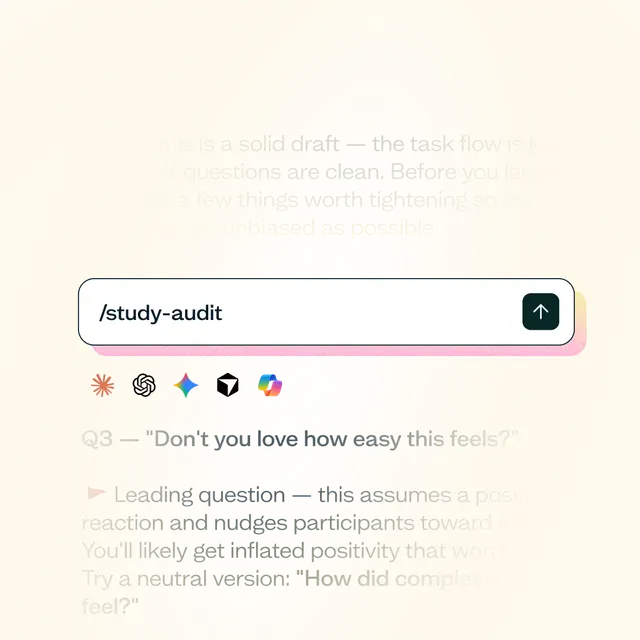
Skill spotlight: Lyssna's Research Study Audit skill reviews a study before launch and flags biased questions, confusing answer choices, and weak screeners – a fast pass before a read-through.
FAQs about recruiting participants with AI
Not for anything where real behavior or lived experience is what you're trying to learn. Synthetic (AI-simulated) participants can be useful for early hypothesis generation or training new researchers, but they reflect patterns in training data, not your actual users – treat them as a different, earlier-stage method rather than a substitute.
It's a short AI-run conversation with a candidate, used on top of or instead of a static screener, that can pick up on hesitation or inconsistency in how someone answers – catching evasive or contradictory responses a screener alone would miss. It can speed up recruitment, but carries a real bias risk, so it still needs a human spot-check on edge cases.
Yes – some platforms use AI to match a research ask against your existing customer or CRM records. It's faster and reaches a "warmer" audience, but it only reaches people you already have a relationship with, and it depends on how clean your underlying data is.
It looks for patterns like device fingerprinting matches, unusually fast or uniform response times, and duplicate-signup signals, flagging them before a participant starts the actual study. A flag isn't certainty – it's a starting point for human review, since legitimate participants can occasionally trigger the same signals.
Treat them as a strong starting point, not a final answer. AI-recommended filters are only as good as the screener or description you gave them, so it's worth reviewing the actual filter logic before you launch a study against it.
No. Lyssna's AI recruiting features apply AI-assisted filtering to its real participant research panel; quality and fraud protection is handled separately through a mix of automated checks and human review. It doesn't offer synthetic (AI-simulated) participants or AI-moderated screening interviews.