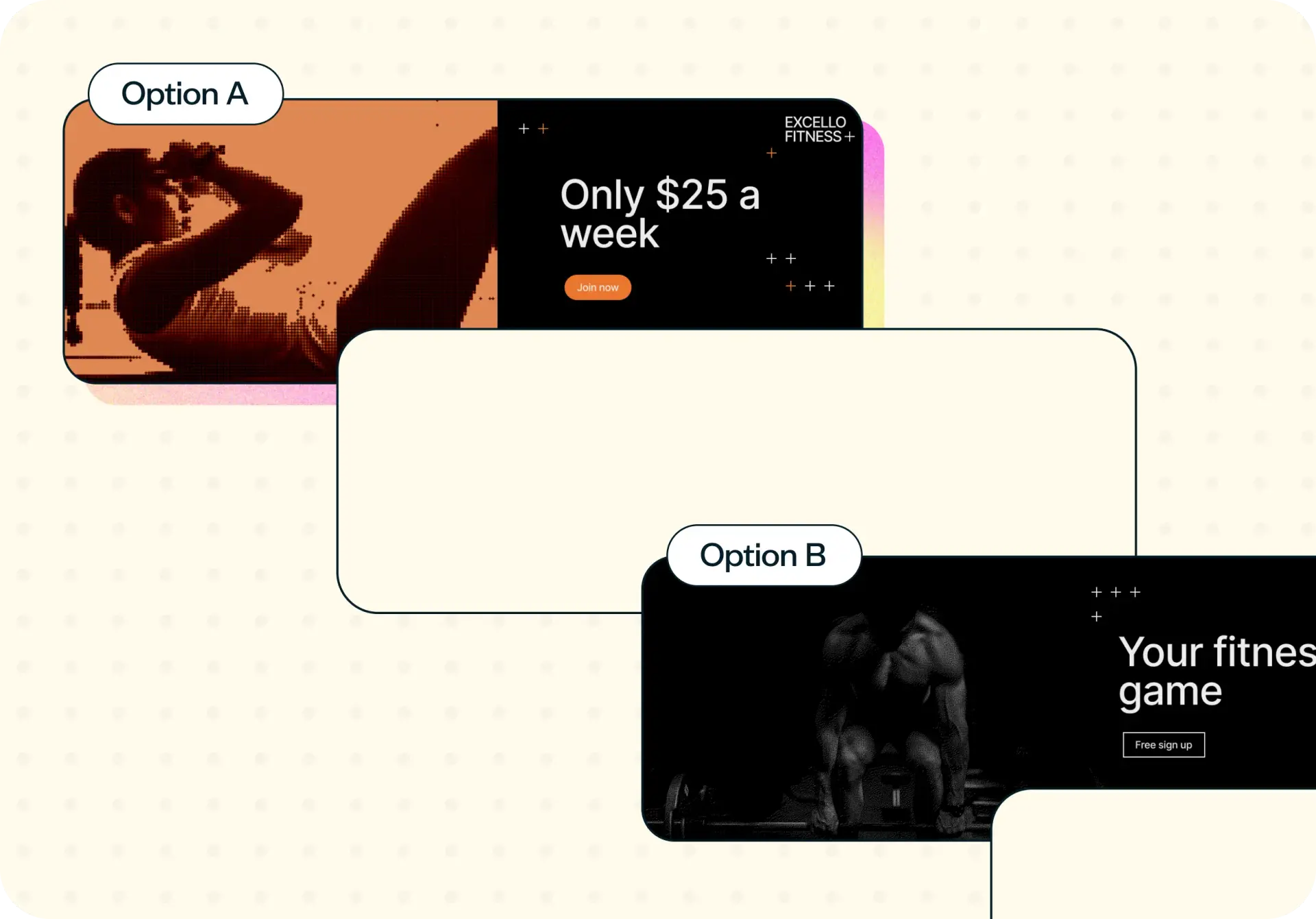

Ad creative testing means putting two or more ad concepts in front of people who match your target audience before committing production or media budget, and asking which they prefer, which they remember, and which would prompt them to act. It's different from A/B testing inside an ad platform, which compares creative that's already running and needs real spend to reach a result. This template runs a preference test that works at concept stage, on rough work, and returns the reasoning behind the choice, not just the winner.
The problem with untested ad creative
Most ad creative gets signed off in an internal meeting, then launched straight into paid media. Nobody outside the room has seen it, and the first real feedback arrives in a campaign report, after the budget is already spent. A 20-minute preference test earlier in the process would have shown the same result for a fraction of the cost, with time to act on it.
Here are some common signs your ad creative needs testing:
You have several creative directions and are choosing based on internal preference.
Media budget is committed before anyone outside the team has seen the work.
Your last campaign underperformed, and you can't say which element failed.
Production costs make it expensive to be wrong.
You're launching into a segment your team doesn't belong to.

What this template helps you discover
A preference test with follow-up questions gives you four distinct reads on your ad creative, not just one.
Which ad resonates most
The core preference result: when participants see your concepts side by side, which one do they choose? A direct read on which creative your audience is drawn to, independent of production cost or internal opinion.
Whether the result actually holds up
Lyssna flags automatically when a lead isn't statistically significant, so a narrow margin doesn't get mistaken for a clear winner. You'll know whether to act on the result or collect more responses first.
Which one prompts action
Participants rate how likely each concept is to get them to click, on a simple scale. It's stated intent, not a guarantee, but it's a strong early signal of which creative is doing its job.
The reasoning behind the choice
A follow-up question asks participants why they chose the concept they did, in their own words: the specific detail, like clarity, tone, or what felt trustworthy or confusing, that a preference number alone can't tell you.
What you'll test
You can test two to four ad concepts in a single study, at any level of fidelity. A rough sketch, a static mock-up, and a finished piece of creative can all sit in the same test. The template doesn't require production-ready assets.
That matters most at concept stage, when the decision is which direction to develop further, not which final asset to ship. Testing rough work means you can validate a direction before committing design or production budget to it, and before anyone outside the team has weighed in.
Whether you're comparing a handful of headline directions, a few hero images, or full storyboards for a video ad, the same structure applies: participants see the concepts, choose a preference, and answer follow-up questions that explain the choice.
How the research works
This template combines two research components: a preference test to find the winning concept, and a set of follow-up questions to understand why.
Preference test
Participants view your ad concepts side by side and choose the one they prefer. It works the same way as Preference testing, one of Lyssna's core research features (learn more in our guide to preference testing). Preference testing is one of several established UX research methods for comparing design or creative options. Because it's a direct comparison rather than a live split test, you get a usable result from a small, targeted sample, without needing a campaign to be running. Lyssna also flags automatically when a lead isn't yet statistically significant, so a narrow margin doesn't get mistaken for a clear winner.
Follow-up questions
After choosing a preference, participants answer two follow-up questions: why they chose the concept they did, in their own words, and how likely they'd be to click on it, on a simple scale. This is where the template earns its value – a live A/B test in an ad platform can tell you which creative won, but not why.
It's worth being precise about scope here: this template measures preference, stated intent, and the reasoning behind both, among people who match your target audience. It doesn't predict click-through rate or conversion, which depend on targeting, placement, bidding, and competitive context in the auction.
How to use this template
Follow these steps to test your ad creative:
Start exploring with a free plan. Sign up to get started with no credit card required.
Add your ad concepts. Upload two to four versions of your ad, at whatever fidelity you have. Sketches, static mock-ups, and finished creative can all sit in the same test.
Set your audience. Recruit participants who match your target market from Lyssna's research panel (690,000+ participants across 124 countries with 395+ targeting options) or invite your own audience.
Launch your study. Participants view each concept, choose their preference, and answer the follow-up questions.
Review the results. See which concept won, whether the result is statistically significant, and the reasoning behind each answer.
See what this looks like once real participants have weighed in on a set of ad concepts:
When to use this template
Use this template at concept stage, before anything goes into production, at the point where you're deciding between creative directions rather than polishing a final asset.
Reach for this template when any of the following apply:
You're choosing between two or more concept directions.
You haven't committed media budget yet.
You're entering a new market or audience segment your team doesn't have direct experience with.
You want evidence before a review meeting, not just opinions in the room.
It also works alongside in-flight testing, not instead of it. Run this template first to narrow the field to your strongest direction, then let your ad platform's A/B testing optimize within that narrower set once the campaign is live.
Who this template is for
This template is built for anyone who has to decide which ad creative to run before the campaign starts, including:
Marketers choosing between creative directions ahead of a launch, who need evidence to bring into a review meeting.
Performance and growth marketers who want a stronger starting point before optimizing in-platform.
Creative and brand teams who want audience evidence for a direction, not just internal sign-off.
Founders running their own paid media who don't have a research team to lean on, and need a fast, low-cost way to check a concept before it goes live.
Whether you're testing your first campaign or your fiftieth, this template gives you a way to bring your audience into the decision before the budget does the deciding for you.
FAQs about ad creative testing
You put two or more ad concepts in front of people who match your target audience, using a preference test with follow-up questions. Participants choose which concept they prefer, then explain why in their own words and rate how likely they'd be to click on it.
A/B testing inside an ad platform compares creative that's already running in a live campaign, and it needs real spend to reach a statistically significant result. A preference test runs before that stage, on any fidelity of concept, and tells you why people prefer one option, not just which one won.
Yes. This template is built for concept stage, so you can test sketches, static mock-ups, or storyboards alongside finished creative, and validate a direction before committing design or production budget to it.
Two to four concepts works well in a single study. Fewer than two doesn't give participants a real preference to make, and more than four can dilute how much attention each concept gets.
There's no fixed number. It depends on how many audience segments you want to compare and how confident you need to be in the result. Most teams run a smaller, more targeted sample than an in-platform A/B test would need to reach significance.
You can run this template for free if you're recruiting your own participants, with no extra budget needed to get started. If you recruit through Lyssna's research panel, that requires purchasing credits regardless of your plan tier. Paid plans add benefits like higher participant volume and advanced targeting, but panel access itself is credit-based.
You may also like these templates

We use Lyssna tests to help us make decisions for various projects. From web and mobile design to marketing activities.

Luther Lowe
VP Public Policy & Gov. Affairs at Yelp