28 Sep 2023
|20 min
Preference testing guide
Learn how to gather data on user preferences to make informed design and product decisions.
Preference testing is a quick way to compare design options and understand which version users prefer – and why. This straightforward research method helps teams make confident design decisions by gathering direct user feedback on visual elements, layouts, and messaging approaches.
Whether you're choosing between logo concepts, evaluating homepage designs, or deciding on button styles, preference testing provides the insights needed to move forward with confidence. It's one of the most accessible and efficient ways to validate design choices before committing to development.
Key takeaways
Preference testing reveals which design option users prefer and why – providing both quantitative data (the winner) and qualitative insights (the reasoning behind choices).
Tests deliver results in hours instead of weeks, making them perfect for rapid design iterations and resolving internal debates with objective user data.
The method works for virtually any visual element – from logos and color schemes to button styles, layouts, headlines, and messaging approaches.
100-200 participants typically provide reliable feedback.
Use preference testing early to validate design direction, then follow up with usability testing or A/B testing to ensure your preferred option also performs well functionally.
What is preference testing?
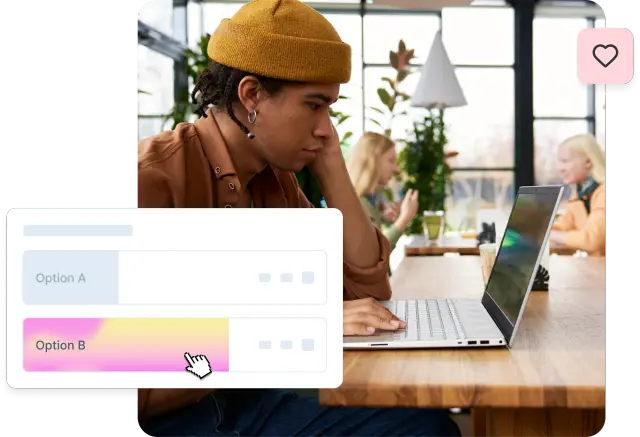
Preference testing is a usability method where participants compare two or more design options and indicate which they prefer, along with their reasoning for that choice.
What happens during preference testing
When taking a preference test, participants view multiple design options side-by-side and choose which one they like best.
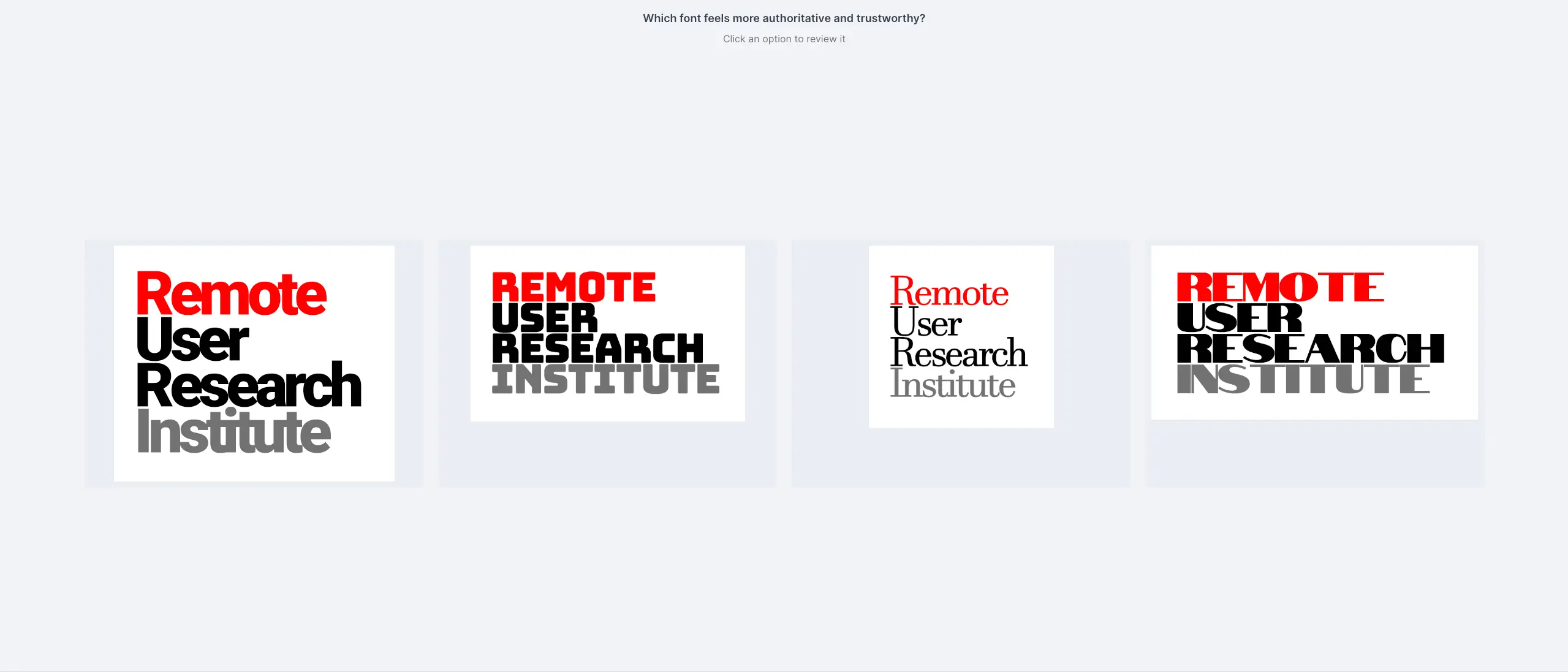
Preference tests are often used to measure aesthetic appeal or desirability, but you can also ask participants to judge designs based on trustworthiness or how well they communicate a specific message or idea.
The below video shows what happens during a preference test using Lyssna.
What you can test
You can test a whole range of design elements – videos, logos, color palettes, icons, website designs, sound files, mockups, copy, packaging designs, and more. In Lyssna, you can test up to six design options at the same time.
Purpose and benefits
The primary goal is to identify design elements that resonate best with users, whether that's color schemes, layout approaches, call-to-action placement, or messaging strategies. This method helps you understand not just what users prefer, but why they prefer it.
The beauty of preference testing lies in its simplicity and speed. Unlike comprehensive usability studies that might take weeks to plan and execute, preference tests can be set up in minutes and provide results within hours. This makes them perfect for rapid design iterations and quick decision-making cycles.
"We used to spend days collecting the data we can now get in an hour with Lyssna. We're able to get a sneak preview of our campaigns' performance before they even go live."
Aaron Shishler
Copywriter Team Lead at monday.com
Why use preference testing?
Preference testing addresses key challenges in the design process by providing fast, user-validated feedback that helps teams make confident decisions. Here's why this method has become essential for design and research teams.
Key benefits at a glance
Benefit | What it means for your team |
|---|---|
Fast insights | Get actionable feedback within hours instead of weeks |
Objective decision-making | Move past internal debates with real user data |
Early validation | Test concepts before investing in development |
Versatile application | Works for branding, UI, messaging, and visual hierarchy |
Cost-effective | Lower investment than comprehensive usability studies |
Fast insights on user preferences
Traditional research methods often require significant time investment, but preference testing delivers actionable insights quickly. Teams can get feedback on design directions within hours rather than weeks, making it ideal for fast-paced development cycles and tight deadlines.
Helps avoid internal debates by relying on user feedback
Design discussions can become subjective and prolonged when based solely on internal opinions. Preference testing provides objective data from real users, helping teams move past personal preferences and make decisions grounded in user feedback. This external validation often resolves internal disagreements more effectively than lengthy design reviews.
Guides design decisions for branding, UI, and messaging
Preference testing excels at validating visual and communication choices across multiple areas:
Branding decisions: Logo variations, color palettes, typography choices
UI elements: Button styles, navigation layouts, icon designs
Messaging approaches: Headlines, value propositions, call-to-action text
Visual hierarchy: Layout options, content organization, spacing decisions
The method works particularly well when you have multiple viable options and need user input to determine which direction resonates most strongly with your target audience.
Provides both quantitative and qualitative feedback
Preference testing allows you to gather both quantitative data (which design won) and qualitative feedback (why users preferred it), giving you insights into both the 'what' and the 'why’.
This combination helps you understand not just user preferences, but the reasoning behind them: insights that inform future design decisions beyond the immediate test.

Pro tip: Use preference testing early in your design process to validate direction, then follow up with usability testing to ensure your preferred design also performs well functionally.
When to use preference testing
Preference testing is most valuable in specific scenarios where you need user input to choose between viable design options. Understanding when to use this method helps you get maximum value from your research efforts.
Best use cases
Scenario | When to use | Why it works |
|---|---|---|
Early design stage | Multiple concept options available | Validates direction before investing in detailed design work |
Pre-finalization | Before committing to UI/UX direction | Confirms chosen approach aligns with user expectations |
Refinement phase | Evaluating branding, hierarchy, or content styles | Helps optimize visual and messaging elements |
Internal debates | Team divided on design direction | Provides objective data to resolve disagreements |
Early design stage when multiple options are available
Preference testing is most valuable when you're still exploring design directions rather than fine-tuning final details. Use it during the concept testing phase when you have several promising approaches but need user input to narrow down your options. This early validation prevents teams from investing significant time in directions that don't resonate with users.
Before finalizing UI/UX direction
Before committing to a specific design approach, preference testing helps validate that your chosen direction aligns with user expectations and preferences. This is particularly important for major interface changes, new product launches, or rebranding efforts where user acceptance is critical.
To refine branding, visual hierarchy, or content styles
Preference testing works exceptionally well for evaluating:
Brand elements: Different logo treatments, color scheme options, or visual style approaches
Content hierarchy: Various ways to organize and present information on a page
Visual styles: Different approaches to imagery, typography, or layout density
Messaging tone: Formal vs. casual copy, different value proposition framings
When not to use preference testing
The method is less suitable for:
If you need to... | Use this instead |
|---|---|
Test complex interaction flows | Usability testing or prototype testing |
Measure task completion and navigation | First click testing or tree testing |
Evaluate detailed usability issues | Usability testing |
Understand information architecture | Card sorting or tree testing |
Pro tip: If your design options are very similar, participants may struggle to identify meaningful differences. Don't be afraid to crop full-page designs to focus on the specific area of variation you're testing.
How to run a preference test (step by step)
Running an effective preference test requires careful planning to ensure you gather meaningful, actionable insights. Here's a detailed walkthrough of the process – the demo below also shows how to run a preference test in Lyssna.
Step 1: Define your goal
You may be tempted to run a preference test simply to settle an argument about two different design versions by asking, "Which design is best?" The problem is that you're asking people to give you their opinion on the design, and they may not be qualified to do that.
Instead, ask a question that has a more specific lens, like: Which design communicates the concept of 'human-centered' best? Which design is easier to understand? Which do you find easier to read?
If you want to ask a more general question, say "Which design do you like best?" This asks participants to reflect on their own preferences rather than which design may be objectively better. Participants are much more qualified to tell you about their preferences than what is or isn't a good design.
Example goals:
"Which homepage design communicates trust better?"
"Which logo feels most professional for our brand?"
"Which button style is most likely to encourage clicks?"
"Which layout makes the content easier to scan?"
Clear, specific goals lead to more actionable insights and help participants provide focused feedback rather than general impressions.
Pro tip: Frame your question around user perception or behavior rather than design quality. Instead of "Which is better?", ask "Which would you trust more?" or "Which makes you want to click?"
Step 2: Prepare variants
Create two or more design mockups, wireframes, or prototypes that represent the different approaches you want to test. The key is ensuring your variants are different enough that participants can meaningfully distinguish between them, while keeping other elements consistent.
Best practices for preparing variants:
Focus on one variable: If testing color schemes, keep layout and typography consistent across options
Ensure sufficient contrast: If your design options are too similar, participants may struggle to identify what they're being asked to judge. Don't be afraid to crop a full-page design to focus on a particular area of variance
Use realistic content: Include actual copy and images rather than placeholder text when possible
Maintain equal quality: Ensure all options are polished to the same level to avoid bias
Technical considerations:
Preference tests are compatible with various asset formats, including JPEGs, GIFs, PNGs, MP3s, and MP4s. You can even mix and match asset formats within one preference test.
Pro tip: Export your designs at the same resolution and dimensions to ensure fair comparison. Uneven image quality can inadvertently bias results toward the better-rendered option.
Step 3: Recruit participants
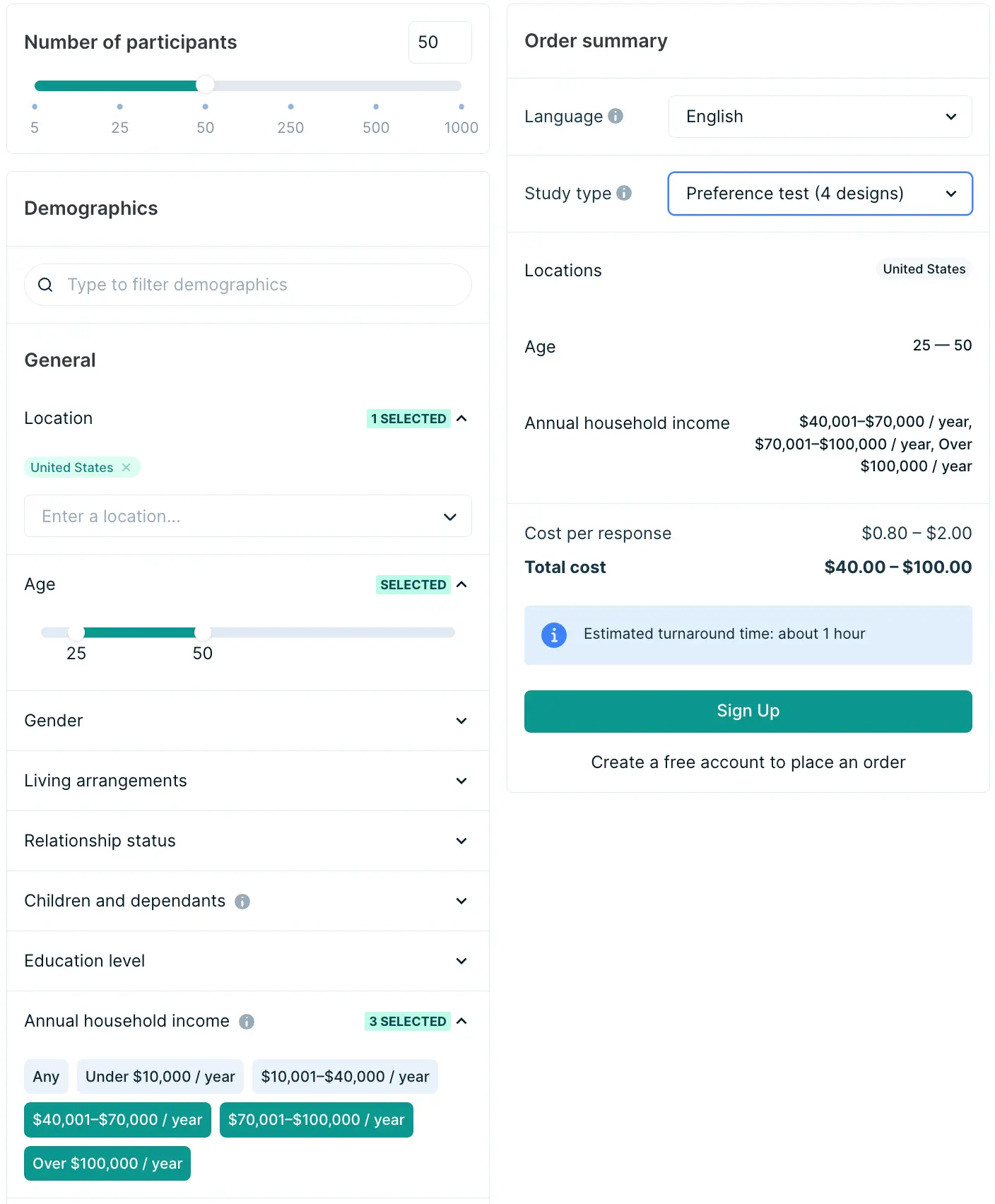
Ideally your target audience should participate in your preference test to ensure the feedback reflects the preferences of people who will actually use your product or service. Consider factors like demographics, experience level, and familiarity with your industry when recruiting participants.
Recruitment approaches:
Internal panel: Use your existing customer base or email list
Research panel: Leverage platforms like Lyssna's research panel for targeted recruitment
Social networks: Reach out through professional networks or social media
Guerrilla testing: Quick recruitment from relevant locations or events
Sample size recommendations
Conversion rate optimization (CRO) expert Rich Page suggests getting at least 100–200 users, as this will give you a good amount of responses to analyze. Ideally more is better, but it depends on your budget.
Pro tip: For landing pages and marketing materials, recruiting from your target audience is critical. For testing general visual appeal or brand perception, broader audiences can provide valuable feedback.
Step 4: Run the test
Participants are shown all the design options side-by-side and have to look at each one individually before they decide which one they like best.
Testing best practices:
Present options randomly to avoid bias from order effects
Keep instructions clear and simple to avoid confusion
Ask follow-up questions about their reasoning
Limit the number of options to avoid overwhelming participants (2-6 options work best)
Essential follow-up questions:
Follow-up questions help you gather qualitative data, which plays a crucial role in uncovering the reasoning behind user preferences. Great follow-up questions can be deceptively simple, but can elicit detailed feedback from your participants.
Effective follow-up questions:
"Why did you choose that design?"
"What did you like about that design?"
"What stands out the most to you about this design?"
"What would make you more likely to [take action] with this design?"
Step 5: Collect and analyze feedback
The analysis phase transforms individual participant responses into actionable design insights.
Quantitative analysis:
Calculate the percentage of participants choosing each version
Look for clear winners (typically 60%+ preference indicates strong direction)
Consider statistical significance, especially with smaller sample sizes
Statistical significance is defined as the likelihood that the best-performing design is actually the favorite, and isn't outperforming the other designs by random chance.
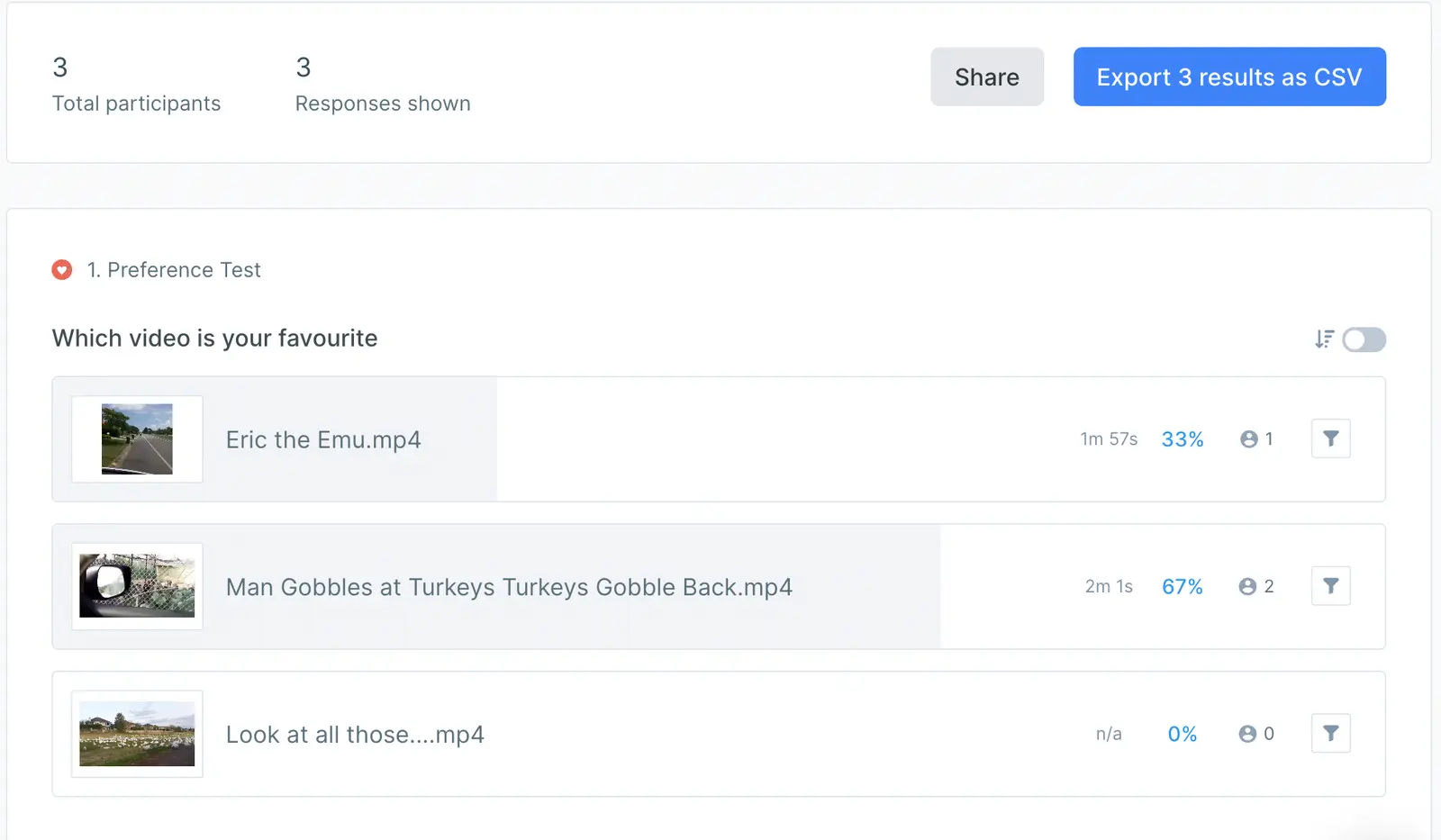
In Lyssna, results show the popularity of each design and will calculate the statistical confidence of the winner on tests with 2 options.
Qualitative analysis:
Categorize the reasons participants gave for their choices
Identify common themes in the feedback
Look for unexpected insights that might inform future design decisions
Note any concerns or negative feedback about the winning option
What to look for
Analysis focus | What to examine |
|---|---|
Clear winner | Does one option have 60%+ preference? |
Reasoning patterns | What common themes emerge in the "why" responses? |
Unexpected insights | Did participants notice things you didn't anticipate? |
Concerns about winner | Are there any negative patterns even in the preferred option? |
The combination of quantitative preference data and qualitative reasoning provides a complete picture of not just what users prefer, but why they prefer it. This deeper understanding helps inform not just the immediate design decision, but future design choices as well.
Pro tip: Use Lyssna's AI summary feature to quickly identify common themes in open-ended responses. This can save hours of manual analysis and help you spot patterns faster.
Preference testing examples
The best way to understand preference testing is to see it in action. We've created ready-to-use preference testing templates that show you exactly how to set up different types of preference tests, along with an example of the results.
Explore our templates:
Test desirability and design preferences: Test how users feel about your product's design and make sure it resonates emotionally, driving both adoption and satisfaction.
Evaluate feature preferences: Use preference testing to prioritize features for your product roadmap based on user preference.
Test a website form: Make sure your website forms are user-friendly and efficient.
Evaluate logo and brand appeal: Test logo and brand preferences to ensure your design resonates with your target audience and boosts brand appeal.
Test your icon designs: Improve your icon designs for better user engagement and clarity through preference testing.
Improve app store visibility: Find out what grabs your users' attention and encourages them to click on your app store listing.
Choose the best video creative: Understand your target audience's preferred video creative for higher engagement and better conversions.
Get feedback on your swag: See what resonates with your customers, so you can deliver items they’ll actually love.
Each template includes sample questions, follow-up prompts, and an example of the test results.
Pro tip: Start with a template and customize it for your specific needs. You can test anything visual – logos, layouts, messaging, colors, icons, or complete page designs.
Pros and cons of preference testing
Like any research method, preference testing has specific strengths and limitations. Understanding these helps you use this method effectively and know when to complement it with other research approaches.
Quick comparison
Pros | Cons |
|---|---|
Quick and easy to set up – Tests can be created and launched within minutes | Doesn't measure usability – Preference doesn't always correlate with task completion |
Inexpensive – Lower cost compared to comprehensive usability studies | Limited to first impressions – May not capture how designs perform during actual use |
Resolves design debates – Provides objective user data to settle internal disagreements | Results may be subjective – Personal taste can influence choices more than practical considerations |
Early validation – Catches potential issues before significant development investment | Context limitations – Testing isolated elements may not reflect complete user experience |
Clear, actionable results – Straightforward data that directly informs design decisions | Potential for bias – Participants might choose based on familiarity rather than actual preference |
Flexible format support – Works with images, videos, audio, and interactive prototypes | Surface-level insights – May not uncover deeper usability issues that emerge during real use |
Advantages in detail
Quick and easy to set up
Tests can be created and launched within minutes, making them ideal for rapid design iterations. This speed allows teams to test multiple variations quickly and make data-driven decisions without disrupting development timelines.
Inexpensive
Preference testing requires significantly lower investment compared to comprehensive usability studies or focus groups, making it accessible for teams with limited research budgets.
Helps resolve design debates
Provides objective user data to settle internal disagreements. Instead of relying on personal opinions or HiPPO (Highest Paid Person's Opinion), teams can make decisions grounded in actual user feedback.
Early validation
Catches potential issues before significant development investment. Testing concepts early prevents teams from building features or designs that don't resonate with users.
Clear, actionable results
Straightforward data that directly informs design decisions. The combination of quantitative preferences and qualitative reasoning makes next steps obvious.
Flexible format support
Works with various media types including images, videos, audio files, and interactive prototypes, giving teams flexibility in what they test.
Limitations to consider
Doesn't measure task success or usability
Preference doesn't always correlate with actual usability or task completion. A design users say they prefer might not be the one they can actually use most effectively.
Limited to visual appeal and first impressions
May not capture how designs perform during actual use over time. Long-term usability issues won't surface in a quick preference test.
Results may be subjective
Personal taste can influence choices more than practical considerations. What users prefer aesthetically might not align with what works best functionally.
Context limitations
Testing isolated elements may not reflect how they work within the complete user experience. A button that looks great in isolation might not work in the full page context.
Potential for bias
Participants might choose based on familiarity rather than actual preference. People often gravitate toward designs that look similar to what they already know.
Surface-level insights
May not uncover deeper usability issues that emerge during real use. Complex interaction problems require hands-on testing to identify.
When to supplement with other methods
Preference testing works best when combined with other research methods:
Combine with... | What it adds |
|---|---|
Usability testing | Validates that preferred designs also perform well functionally |
Five-second testing | Confirms immediate comprehension and message clarity |
First click testing | Ensures users know where to click to accomplish tasks |
A/B testing | Measures real-world performance with actual user behavior |
Pro tip: Use preference testing early in your design process to validate direction, then follow up with usability testing or prototype testing to evaluate actual interaction and task completion. This approach leverages the speed of preference testing while ensuring final decisions are validated with behavioral data.
Preference testing vs A/B testing
Understanding the distinction between preference testing and A/B testing is crucial for choosing the right method for your research goals. While both methods compare design options, they serve fundamentally different purposes.
Key differences at a glance
Aspect | Preference Testing | A/B Testing |
|---|---|---|
Goal | Gather opinions and preferences | Measure actual behavior and performance |
Sample size | Small (50-200 participants) | Large (hundreds to thousands) |
Output | User preferences and reasoning | Conversion rates and statistical significance |
Timeline | Hours to days | Weeks to months |
Cost | Low | Higher (due to traffic requirements) |
Use case | Design direction decisions | Live performance optimization |
Traffic needed | None | At least 5,000 visitors per week |
Preference testing = opinions (small sample, design direction)
Preference testing captures what users say they like and why. It's perfect for early-stage design decisions when you need to understand user preferences and gather qualitative insights about different approaches. The focus is on gathering opinions, reactions, and reasoning from a representative but smaller sample of users.
A/B testing = behavior (large sample, conversion impact)
A/B testing measures what users actually do when presented with different options in real-world conditions. It requires larger sample sizes to achieve statistical significance and focuses on measurable outcomes like click-through rates, conversion rates, or engagement metrics.
The problems with A/B testing
However, there are three major problems with A/B testing: It doesn't tell you why your visitors preferred the winning version. It only tells you which version won (if any). It doesn't give you any feedback from your visitors about the improvements you were A/B testing. Most websites don't have enough traffic to conduct A/B testing.
Use preference testing before A/B testing
The most effective approach combines both methods sequentially:
Start with preference testing to identify promising design directions and understand user reasoning
Refine designs based on preference testing insights
Implement A/B testing to validate performance with real user behavior
This approach leverages the speed and insights of preference testing while ensuring final decisions are validated with actual user behavior data.

"I recommend preference testing each of the key pages on your website, particularly your home page, product pages, and checkout or signup flow. If you have enough traffic (at least 5,000 visitors per week to the page you're testing), you should run an A/B test on this winning page."
– Rich Page, CRO Expert
Best practices for preference testing
Following these best practices ensures your preference testing delivers reliable, actionable insights that inform better design decisions.
Always ask why users made their choice
The quantitative data showing which option users prefer is only half the story. The qualitative insights explaining their reasoning often provide the most valuable guidance for future design decisions. Without understanding the "why," you might miss important nuances that could inform broader design principles.
Effective follow-up questions:
"Why did you choose that design?"
"What specific elements influenced your decision?"
"What did you like or dislike about the other options?"
"How would you use this in your daily work/life?"
Pro tip: Don't just ask "why" once. If a participant gives a brief answer like "I liked the colors," follow up with "What about the colors that appealed to you?" to get deeper insights.
Keep tests short and focused
Participants lose attention and provide lower-quality feedback when tests are too long or complex. Focus on one key design decision per test rather than trying to evaluate multiple elements simultaneously. This approach provides clearer insights and reduces participant fatigue.
Best practices:
Limit to 2-4 design options per test (maximum 6)
Ask 2-4 follow-up questions maximum
Test one variable at a time (e.g., just color, not color + layout + copy)
Complete tests should take 5 minutes or less
Avoid showing too many options at once
While Lyssna supports up to six design options, showing too many choices can overwhelm participants and lead to decision paralysis. Two to four options typically provide the best balance between giving users meaningful choices and maintaining focus. More options can be tested in separate rounds if needed.
Recommended approach
Number of options | When to use |
|---|---|
2 options | Clear A/B comparison, final decision between two directions |
3-4 options | Exploring multiple approaches, ideal for most tests |
5-6 options | Only when necessary, requires highly engaged participants |
Randomize order to reduce bias
The order in which options are presented can influence participant choices, with some users showing preference for the first or last option they see. Randomizing the presentation order across participants helps eliminate this bias and ensures more reliable results.
Lyssna automatically randomizes the order of design options for each participant, ensuring unbiased results.
Use realistic, high-quality mockups
Ensure all design options are polished to the same level of quality. Avoid bias based on execution quality rather than design approach. If one option looks more "finished" than another, participants may prefer it simply because it appears more professional, not because the underlying design is better.
Quality checklist:
Same image resolution and dimensions across all options
Consistent level of detail and polish
Real content rather than placeholder text when possible
Equal visual refinement (avoid comparing sketches to polished mockups)
Pro tip: If you're testing early concepts, it's fine to use wireframes or sketches – just make sure all options are at the same fidelity level.
Test with your actual target audience
Generic audiences can provide initial directional feedback, but for meaningful insights, recruit participants who match your actual user demographics. Consider age, experience level, industry familiarity, and other relevant factors.
Audience considerations:
For consumer products: Match age, location, lifestyle factors
For B2B tools: Target job roles, company size, industry
For specialized products: Ensure domain knowledge or experience level matches
For rebrands: Include both existing customers and potential new users
Consider context in your testing
Show designs in realistic usage scenarios when possible. A logo that looks great on a white background might not work well on your actual website. A button style that seems clear in isolation might be confusing in your full interface.
Ways to add context:
Show UI elements within the full page layout
Display logos on actual product packaging or website headers
Present copy within the complete email or landing page
Include surrounding interface elements for buttons or icons
Document your methodology
Ensure consistent testing approaches across different projects by documenting:
Test objectives and success criteria
Participant recruitment criteria
Questions asked and their exact wording
Sample size and demographics
Key findings and decisions made
This documentation helps you refine your process over time and makes it easier to train team members on preference testing best practices.