
21 Jan 2026
|29 min
Types of user interviews
Discover the different types of user interviews and when to use each approach. From exploratory to usability interviews – learn how to conduct them effectively.

User interviews are one of the most powerful tools in UX research. They reveal the "why" behind user behavior that analytics alone can't capture. But not all interviews serve the same purpose.
Different types of user interviews help you tackle different research challenges, from identifying pain points to testing prototypes and validating design decisions.
Picture this: Your product's analytics show that 60% of users abandon onboarding right after the third sign-up step. Without talking to users, you're left guessing what's causing the drop-off. A quick conversation with just a handful of users could reveal exactly what's going wrong – and, more importantly, how to fix it.
In this guide, we'll walk through the different types of user interviews, when to use each approach, and how to conduct them effectively.
Whether you're validating a new concept, understanding user pain points, or testing a prototype, choosing the right interview type can make the difference between actionable insights and wasted effort.
Key takeaways
Choose the right interview type for your research goals. Exploratory and generative interviews help you discover what to build, while usability and feedback interviews refine how you build it.
Match your method to your stage of development. From uncovering user pain points early on to testing prototypes and gathering competitive insights later, each interview type reveals unique information at different points in the product lifecycle.
Preparation shapes your results. Define clear research objectives, recruit the right participants, and craft thoughtful questions to maximize the value of every conversation.
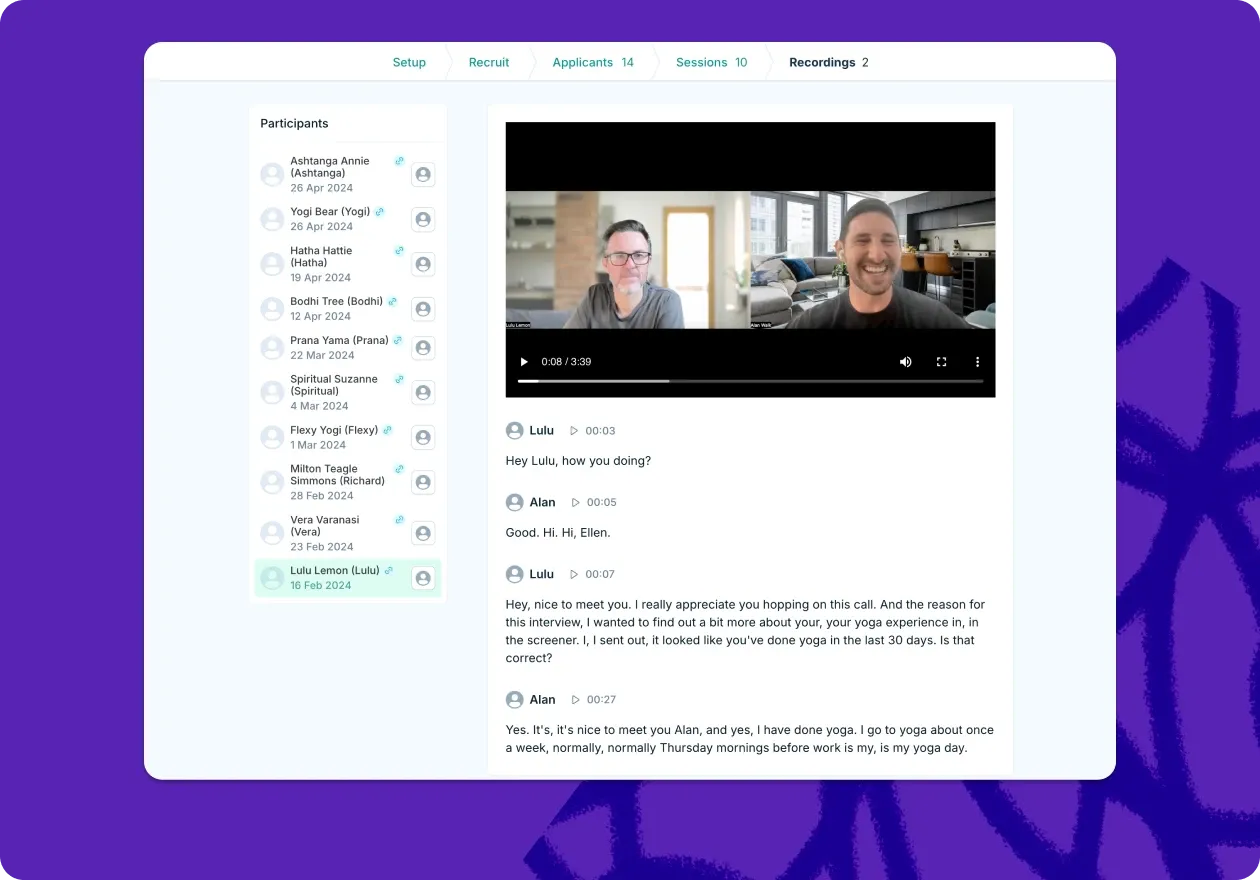
Turn insights into action. The real power of user interviews comes from analyzing patterns, synthesizing findings, and translating those insights into meaningful product decisions. Tools like Lyssna help you manage the entire process – from recruiting participants to analyzing transcripts – so you can focus on what matters most: understanding your users.
Streamline your interview process
From recruiting the right participants to analyzing what you learn, Lyssna helps you manage every stage of user interviews in one place.
What are user interviews?
User interviews are structured conversations between researchers and participants designed to gather qualitative insights about user behaviors, motivations, needs, and experiences. Unlike surveys or analytics, interviews provide a rich, contextual understanding of the "why" behind user actions.
In practice, user interviews involve asking open-ended questions to understand how people think, feel, and behave in relation to a product, service, or problem space. They're a fundamental research method that helps teams make informed decisions based on real user needs rather than assumptions.

Key characteristics of effective user interviews
Conversational approach. You're having a natural dialogue that encourages participants to share detailed thoughts and experiences, not reading from a script.
Open-ended questions. Your questions invite explanation rather than simple yes/no answers.
Active listening. You focus on understanding what participants are telling you rather than confirming what you already believe.
Contextual exploration. You're digging into the broader context of user behavior and decision-making, not just surface-level responses.

What makes user interviews different? User interviews differ from other research methods in their flexibility and depth. While surveys can tell you what users do, interviews reveal why they do it. While usability tests show how users interact with your product, interviews uncover the motivations and context behind those interactions.
User interviews plan
Successful user interviews start with thorough planning. A well-structured plan ensures you gather relevant insights while making efficient use of both your time and your participants' time.
Planning step | Key questions to answer |
|---|---|
Define objectives | What do you want to learn? Are you exploring a problem or testing a solution? |
Choose interview type | Do you need discovery (exploratory) or validation (usability/feedback)? |
Identify participants | Who are your target users? What demographics, behaviors, or goals matter most? |
Plan logistics | How long, what format, how will you record, and where will it happen? |
Prepare materials | Do you have prototypes, mockups, or stimuli ready? Is your tech tested? |
Define your research objectives
Before scheduling any interviews, clearly articulate what you want to learn. Ask yourself:
Are you defining a problem or testing a solution? Exploratory and generative research interviews help uncover user needs and motivations. Usability and customer feedback interviews refine what you've already built.
Do you need deep insights or quick validation? Exploratory and generative interviews reveal big-picture behavior and pain points. Usability and feedback interviews test real-world interactions and expectations.
Choose your interview type
Different research goals require different interview approaches. If you're figuring out what to build, go exploratory. If you're refining how to build it, go usability. If you want to find out whether your design or product meets expectations, go with feedback interviews.
Identify your target participants
Start by identifying the key traits of your target audience. Consider demographics (like age, location, or occupation), behaviors (such as how they interact with your product), and psychographics (like goals, frustrations, or values).
Plan your timeline and logistics
Duration. Most interviews last 30–60 minutes, depending on the type and depth you need.
Format. Decide between in-person, video call, or phone interviews based on your research needs and participant accessibility.
Recording. Plan how you'll capture the conversation for later analysis – and make sure you have participant consent.
Environment. Choose a setting that makes participants comfortable and encourages honest feedback.
Prepare your research materials
Gather any prototypes, mockups, or materials you'll need during the interview. Test all technology beforehand to avoid technical hiccups during the session.

How to conduct user interviews
The way you conduct user interviews depends largely on your research goals and the type of insights you need. Each interview type serves different purposes and requires specific approaches to maximize effectiveness.
Interview types at a glance
Interview type | Purpose | Best used when | Example scenario |
|---|---|---|---|
Exploratory | Uncover user needs and pain points; includes stakeholder interviews for alignment | Starting a new project or brainstorming solutions | Product manager interviews stakeholders and potential users about pain points for new feature roadmap |
Generative | Explore unmet needs, emerging behaviors, and user aspirations for innovative solutions | Early product discovery or planning new products | UX researcher conducts JTBD interviews to understand why users switch from competitors |
Usability | Evaluate ease of use, identify barriers, refine functionality | During design and development to improve UX | Team tests new checkout flow with users completing tasks via semi-structured interviews |
Customer feedback | Gather satisfaction feedback, feature requests, and improvement opportunities | Post-launch or during regular updates | Customer success team interviews users to understand varying satisfaction levels |
Ethnographic | Observe users in real-world environments to understand natural behaviors and contexts | Researching sensitive topics or studying usage patterns | UX researcher shadows healthcare workers using new medical software |
Diary studies | Track experiences over time to understand long-term engagement and pain points | Measuring ongoing behavior or satisfaction over weeks | Users log fitness app interactions for four weeks with daily feedback |
Intercept | Gather spontaneous feedback during key interactions | Need real-time insights on an experience | Team asks users mid-session about first impressions of new homepage |
Competitive analysis | Understand competitor product engagement to identify gaps and unmet needs | Assessing competitive advantages and user expectations | Interview users who switched from a competitor to understand their pain points |
Exploratory interviews
Imagine you're a product manager tasked with improving your company's onboarding flow. Analytics show a 40% drop-off at step three, but the data doesn't tell you why.
You could guess: maybe the form is too long, maybe users are confused, maybe they're just not motivated enough. Or you could talk to people who abandoned the process and find out what actually happened.
That's exploratory research in action. You're investigating a problem space, mapping out how users currently behave, and identifying pain points you might not have anticipated.
Exploratory interviews work best when you're starting something new: a project, a feature, a market you don't fully understand yet. The goal isn't to validate an idea you already have. It's to make sure you're solving the right problem in the first place.
How to approach them
Start broad. You're not testing a hypothesis; you're gathering information. Ask participants to walk you through their current process, describe recent experiences, and explain what frustrates them. Follow their lead. The most valuable insights often come from tangents you didn't plan for.
Resist the urge to propose solutions. The moment you say "what if we built something that..." you've shifted from discovery to validation. Stay curious, stay neutral, and let participants tell you what matters to them.
Questions that open up conversation
"Can you walk me through how you typically handle [task]?"
"What's the most frustrating part of your current process?"
"Tell me about the last time you encountered this challenge."
Generative interviews
Exploratory interviews tell you what's happening. Generative interviews help you understand why, and what could be.
Both happen early in the product development process, but they serve different purposes. Exploratory research maps the current landscape: workflows, pain points, behaviors. Generative research digs into motivations, aspirations, and unmet desires. It's less about documenting problems and more about uncovering opportunities for innovation.
Think of generative interviews as creative fuel. You're asking participants to imagine ideal experiences, articulate what they wish existed, and reveal the emotional drivers behind their behavior. The insights you gather here inspire new directions rather than confirm existing ones.
What sets them apart
Exploratory asks: "What problems do you have?" Generative asks: "What do you wish you could do?"
Exploratory focuses on the present. Generative leans into the future.
Exploratory documents reality. Generative imagines possibility.
In practice, many discovery interviews blend both. You might start exploratory (understanding current workflows) then shift generative as you explore what users ultimately want to achieve.
Questions that spark imagination
"If you could wave a magic wand and solve this perfectly, what would that look like?"
"What would make this experience delightful rather than just functional?"
"How do you feel when you're using [current solution]?"
Pro tip: Keep an eye out for emotional responses or body language changes during certain topics. These can signal areas where deeper exploration might yield valuable insights.
Usability interviews
Here's a trap that's easy to fall into: you ask participants to "think aloud" as they complete tasks, and suddenly the session feels like a performance. They narrate every click, second-guess themselves, and behave nothing like they would in real life.
Think-aloud protocol is valuable, but it needs a light touch. Instead of asking people to verbalize everything, try more natural prompts: "What are you looking for right now?" or "What do you expect to see next?" You'll get richer responses without making participants feel like they're being tested.
Usability interviews combine observation with conversation. You're watching how users interact with your product or prototype while asking questions that reveal the reasoning behind their behavior. The goal is to understand both what happens and why.
Getting the balance right
Prepare realistic tasks that reflect actual user goals, not artificial scenarios designed to showcase features. Give participants room to explore, but stay engaged enough to probe when something interesting happens. If they hesitate, ask what they expected. If they succeed easily, ask if anything surprised them.
Avoid the instinct to explain or defend your design. When a participant struggles, that's data. Your job is to understand their experience, not to teach them the "right" way to use the product.
Questions that reveal thinking
"What's going through your mind as you look at this screen?"
"What would you expect to happen if you clicked here?"
"How does this compare to what you were expecting?"
Pro tip: Start with high-impact questions early. "What's the first thing you notice?" and "What do you think this does?" capture unfiltered first impressions before participants adapt to the interface.
Customer feedback interviews
The most common mistake in customer feedback interviews is asking broad questions and getting broad (useless) answers. "How do you like our product?" invites vague positivity. "What do you think of Feature X?" surfaces opinions without context.
Better interviews focus on specific experiences. What happened the last time they used your product? What were they trying to accomplish? What worked, what didn't, and what did they do about it?
Customer feedback interviews happen after launch. You're learning how your product performs in the real world with real users over time. The insights inform iteration, roadmap priorities, and retention strategies.
What to dig into
First impressions. What drew them to try your product initially? Understanding acquisition motivations helps you attract more of the right users.
Core value. Which features do they actually use, and which have they forgotten exist? Usage patterns reveal what matters.
Friction points. Where do they get stuck or frustrated? These are your highest-impact improvement opportunities.
Gaps. What do they wish your product did that it doesn't? Feature requests need interrogation. The stated request often masks a deeper need.
Questions that get specific
"What initially drew you to try our product?"
"Which features do you find most valuable in your daily work?"
"What would need to change for this to be a perfect solution for you?"
Ethnographic interviews
Some things you can only learn by being there.
Ethnographic interviews put you in the user's environment: their office, their home, their clinic, wherever they actually use your product or experience the problem you're trying to solve. Instead of asking people to recall and describe their behavior, you observe it directly. Then you ask questions about what you're seeing.
This approach reveals context that remote interviews miss. How does a nurse actually use that software during a busy shift? What interruptions happen? What workarounds have they invented? What's on their desk, on their screen, competing for their attention?
The tradeoff is time and access. Ethnographic research requires permission to enter someone's space, often for hours at a stretch. You need to build trust, stay unobtrusive, and resist the urge to interrupt what you're observing. But when context matters (and it usually matters more than we assume) there's no substitute for being there.
Questions that ground observation
"Can you show me how you typically set up your workspace for this task?"
"What else is usually happening around you when you use this product?"
"How do other people in your environment influence your approach?"

Diary studies
The biggest challenge with diary studies is participation.
You're asking people to document their experiences over days or weeks: what they did, how they felt, what frustrated them. That's a real commitment, and it's easy for engagement to drop off after the first few entries.
So before you worry about what questions to ask, solve the logistics. Make logging as easy as possible with a quick mobile form, a voice memo, or a few taps in an app. Check in regularly to maintain momentum and clarify entries. Set clear expectations upfront about how much time this will take.
When diary studies work, they're powerful. You capture experiences as they happen rather than relying on memory. You see patterns emerge over time. You understand how context and mood affect behavior across different situations.
The method shines when you're studying infrequent activities (people won't remember the details in a single interview), tracking how perceptions change over time, or exploring emotional experiences that unfold gradually.
Prompts that capture the moment
"Describe what prompted you to use [product] today."
"How did you feel before, during, and after this experience?"
"What would have made this experience better?"
Intercept interviews
Keep it short. That's the first rule of intercept interviews.
You're approaching people in context (in a store, on a website, right after they've completed a task) and asking for a few minutes of their time. They didn't sign up for this. They have somewhere to be. Respect that, and you'll get more honest, useful responses.
Intercept interviews capture immediate reactions while the experience is fresh. There's no recall bias, no reconstructed narrative. You're hearing what someone thinks and feels right now.
The format suits specific needs: understanding first impressions, gathering feedback from users who wouldn't volunteer for formal research, testing concepts in realistic settings. But it requires focus. Pick two or three questions that get to the heart of what you need to learn, and resist the temptation to tack on "just one more."
Questions that respect the moment
"What brought you here today?"
"How was your experience with [specific aspect]?"
"What would make this experience better for you?"
Competitive analysis interviews
Here's what doesn't work: asking users "What do you think of [competitor]?" and expecting useful insights.
Opinions about brands are shallow. People will tell you they "like" or "don't like" a product without being able to articulate why. What you actually want to understand is behavior: how they interact with competing products, why they chose them, and what needs remain unmet.
What to listen for
Switching triggers. What finally pushed them to try something new? These pain points are opportunities waiting for you.
Workarounds. Are they using the competitor in unintended ways or pairing it with other tools? Market gaps often hide here.
Unspoken expectations. What do users assume any product in this category should do? These are table stakes.
Emotional language. Frustration, delight, resignation. How users feel tells you as much as what they do.
Questions that surface real behavior
"Walk me through how you decided to use [competitor]."
"What were you trying to accomplish when you first signed up?"
"What's something you thought it would do that it doesn't?"
"If you could combine features from different products in this space, what would your ideal look like?"
Pro tip: The goal of asking questions isn't getting answers. It's opening discussions. The insights you get from reading between the lines are often far more valuable than direct responses.

User interview questions
The quality of your user interview questions directly impacts the depth and usefulness of what you learn. A well-crafted question opens up conversation; a poorly crafted one shuts it down.
What makes a good interview question
Good interview questions share a few traits: they're short, clear, open-ended, and free of jargon. They invite stories rather than one-word answers. They don't lead participants toward a particular response.
Instead of… | Try… |
|---|---|
Do you like this feature? | What's your experience been like using this feature? |
Was the checkout process easy? | Walk me through what happened when you checked out. |
Don't you think this layout is confusing? | What stood out to you about this layout? |
Question types at a glance
Question type | Purpose | Example |
|---|---|---|
Opening | Build rapport and ease participants into the conversation | "Tell me a bit about your role and how you ended up in it." |
Experience | Explore specific behaviors and interactions | "Walk me through the last time you used [product]." |
Opinion | Understand attitudes and preferences | "What matters most to you when choosing a tool like this?" |
Feeling | Uncover emotional responses and motivations | "How did you feel when that happened?" |
Knowledge | Assess understanding and mental models | "What do you think this button does?" |
Hypothetical | Explore potential scenarios and preferences | "If you could change one thing about this process, what would it be?" |
Go-to question frameworks
These frameworks work across most interview types. Adapt the bracketed parts to fit your context.
For understanding current behavior
"Walk me through the last time you [task]."
"How do you typically approach [task]?"
"What's your usual process for [task]?"
For exploring motivations
"What matters most to you when [decision or task]?"
"What would make you choose one option over another?"
"What would need to change for you to [desired action]?"
For gathering feedback
"What worked well about [experience]?"
"What was confusing or frustrating about [experience]?"
"How did this compare to your expectations?"
Questions to avoid
Leading questions. "Don't you think this design is cleaner?" steers participants toward agreement. Reframe as: "What's your reaction to this design?"
Yes/no questions. "Did you find it easy?" ends the conversation. Reframe as: "How did you find the experience?"
Double-barreled questions. "What did you think of the layout and the copy?" forces participants to answer two things at once. Ask them separately.
Jargon-heavy questions. "How intuitive was the IA?" assumes shared vocabulary. Use plain language: "How easy was it to find what you were looking for?"
Unlikely hypotheticals. "If you had unlimited budget and time, what would you build?" yields fantasy answers. Ground hypotheticals in reality: "If you could change one thing about your current process, what would it be?"
User interview script
A user interview script keeps your interviews consistent without making them robotic. Think of it as a guide, not a checklist. You want enough structure to stay on track and enough flexibility to follow interesting threads when they emerge.
Anatomy of an interview script
Section | Time | What to cover |
|---|---|---|
Introduction | 5 min | Welcome, explain purpose, address recording/confidentiality, set expectations |
Warm-up | 5–10 mins | Background questions, build rapport, establish context |
Main questions | 30–45 min | Core research questions, follow-ups, room to explore tangents |
Wrap-up | 5 min | Summarize, invite final thoughts, explain next steps, thank participant |
Writing your script
Use conversational language. If a question sounds stiff when you read it aloud, rewrite it until it sounds like something you'd actually say. Build in follow-up prompts so you're not scrambling in the moment. Plan transitions between topics to avoid jarring shifts. And always have a few backup questions ready in case the conversation stalls or wraps up faster than expected.
Leave white space in your script for notes. You'll want room to jot down observations, flag moments to revisit, or note follow-up questions that occur to you mid-session.
Sample script language
Use these as starting points, not word-for-word scripts. Adjust the tone and details to fit your context.
Introduction
"Hi [Name], thank you for taking the time to speak with me today. I'm [Your name] from [Company], and I'm here to learn about your experience with [topic]. This conversation will help us understand how to better serve people like you.
This should take about [duration], and with your permission, I'd like to record our conversation so I can focus on listening rather than taking notes. The recording will only be used by our team for research purposes. Is that okay with you?"
Warm-up
"To get started, could you tell me a bit about your role and how [topic] fits into your daily work?"
Transition to main questions
"Thanks for that background. Now I'd like to dig into some specifics about [topic]. Feel free to share as much detail as you'd like."
Wrap-up
"We're coming to the end of our time together. Before we finish, is there anything else you'd like to share about [topic] that we haven't covered?"
Closing
"This has been really helpful. Thank you again for your time. If you think of anything else after our conversation, feel free to reach out. We'll [explain next steps, e.g., 'be in touch if we have follow-up questions' or 'share a summary of what we learned across all our interviews'].
Pro tip: Print your script or keep it visible on a second screen, but don't read from it. Glance at it to stay oriented, then return your attention to the participant. Eye contact and genuine listening matter more than hitting every question on your list.

Recruit participants for user interviews
Your insights are only as good as the people you talk to. Recruiting the right participants means finding people who actually represent your target users, not just whoever is easiest to reach.
Define your participant criteria
Before you start recruiting, get specific about who you need. Vague criteria lead to mismatched participants and wasted sessions.
Criteria type | What to consider | Example |
|---|---|---|
Demographics | Age, location, occupation, income level | "Marketing managers in the US, 30–45 years old" |
Behavioral | Product usage patterns, experience level, specific actions | "Has used our product at least 3 times in the past month" |
Psychographic | Goals, motivations, values, attitudes | "Prioritizes efficiency over cost savings" |
Contextual | Industry, company size, role responsibilities | "Works at a B2B SaaS company with 50–200 employees" |
Where to find participants
You have two main options: recruit from your own network or go external.
Your own network
Existing customers are often the easiest to reach. Pull from your customer database, ask your support or sales team for contacts, or tap into your user community. The upside: these people already know your product. The downside: they may not represent users you haven't reached yet.
External sources
When you need fresh perspectives or specific demographics, look outside your existing user base. Options include research panels, social media and professional networks, industry forums and communities, recruitment agencies, or referrals from past participants.
[Info tip] Pro tip: Lyssna's research panel gives you access to over 690,000 participants across 395+ demographic and psychographic attributes. If you need to recruit quickly or target specific criteria, it's a faster path than building your own pipeline from scratch.
Recruitment best practices
Be upfront. Explain the purpose, duration, and what you're asking of participants before they commit.
Offer fair compensation. Respect people's time. Incentives should reflect the effort involved.
Screen carefully. Use screener questions to confirm participants meet your criteria before scheduling.
Aim for diversity. Recruit participants who represent your actual user base, not just the easiest to reach.
Over-recruit. No-shows happen. Recruit 20–30% more participants than you need.
Sample recruitment message
Adapt this template to fit your context and tone.
Subject: Share your experience with [topic] (30 min, $50 thank you)
Hi [Name],
We're conducting research to understand how people approach [topic], and your perspective would be really valuable.
We're looking for people who:
[Screening criterion 1]
[Screening criterion 2]
The conversation takes about 30 minutes over video call. As a thank you, we're offering $50 for your time.
Interested? Just reply with a few quick details:
[Screening question 1]
[Screening question 2]
Thanks for considering it.
[Your name]

Practitioner insight: "The interview features have been incredibly helpful to us as we consistently perform both qual and quant, and we've been very happy with the quality of the panel participants."
– Jenn Wolf, Senior Director of CX at Nav
How to analyze user interviews
You've finished your interviews. Now what?
Raw interview data doesn't become useful until you've worked through it systematically. The goal is to move from a pile of transcripts and recordings to a clear set of insights your team can act on.
Before you start analyzing
Good analysis starts with good preparation. A few things to get in place first:
Transcribe your recordings. Text is easier to search, code, and share than audio. Use automated transcription tools to speed this up, but review for accuracy.
Set up your system. Decide where you'll store transcripts, notes, and clips. Consistency matters more than the specific tool.
Involve your team. Multiple perspectives reduce bias. Even if one person leads analysis, have others review and challenge the findings.
Block enough time. Rushed analysis leads to shallow insights. Plan for this phase to take as long as the interviews themselves.
The TFSD framework
One useful lens for organizing what you heard is the Think, Feel, Say, Do (TFSD) model. It helps you separate different types of participant responses.
Category | What to capture | Example |
|---|---|---|
Think | Beliefs, assumptions, mental models | "I assumed it would save automatically." |
Feel | Emotions, frustrations, delights | "I felt anxious clicking submit because I wasn't sure what would happen." |
Say | Direct quotes, verbal feedback | "This is way more complicated than I expected." |
Do | Actions, behaviors, workarounds | “Clicked the back button three times before finding the right page.” |
Not every insight fits neatly into one category, and that's fine. The framework is a starting point, not a rigid system.
From data to insights: A practical process
Analysis isn't linear, but it helps to have a rough sequence. Here's one approach.
1. Immerse yourself in the data
Read or listen to everything at least once before you start coding or categorizing. Note your initial impressions: what stood out, what surprised you, what kept coming up. These first reactions often point to the most significant findings.
2. Code and categorize
Go back through each transcript and highlight key moments. Assign codes (short labels) to different types of observations: pain points, motivations, behaviors, feature requests, moments of confusion. Group similar codes together as categories emerge.
You don't need fancy software for this. A spreadsheet with columns for participant, quote, and code works fine for small studies.
3. Look for patterns
Once you've coded everything, zoom out. What themes appear across multiple participants? Where do people agree? Where do they diverge? Do patterns differ based on participant characteristics (role, experience level, use case)?
Be careful not to overweight outliers. One participant's strong opinion isn't a pattern. Look for signals that repeat.
4. Synthesize into insights
Patterns are observations. Insights are what those observations mean for your product or business.
A pattern might be: "Five of eight participants couldn't find the export button."
An insight is: "The export function is effectively invisible, which blocks a key workflow for power users."
Good insights connect what you observed to why it matters and what you might do about it.
5. Validate and triangulate
Interviews are one data source. Before acting on findings, check them against other signals: analytics, support tickets, survey data, previous research. If the same story emerges across sources, you can be more confident. If findings conflict, dig deeper.
Practitioner insight: "I absolutely love (Lyssna’s) Recordings feature for our prototype tests. It adds so much more context by letting us hear what users are saying and see where they're clicking."
– Tom Alcock, UX Researcher at Vestd
Tools for the job
Need | Options |
|---|---|
Simple organization | Google Sheets, Excel, Airtable |
Qualitative analysis | Dovetail, NVivo, Atlas.ti |
Team synthesis | Miro, FigJam, Mural |
Notes and documentation | Notion, Obsidian, Confluence |
Start simple. You can always move to more specialized tools as your research practice matures.

Pitfalls to watch for
Confirmation bias. It's easy to notice evidence that supports what you already believe and overlook what contradicts it. Actively look for disconfirming data.
Overweighting outliers. One passionate participant can feel like a major finding. Check whether the pattern holds across others before prioritizing it.
Losing context. A quote pulled out of context can mean something very different than it did in the conversation. Keep surrounding details attached.
Analysis paralysis. You'll never feel 100% certain. At some point, you have enough to move forward. Set a deadline and stick to it.
Pro tip: Write up your findings even if they feel rough. The act of explaining what you learned forces clarity. A messy first draft is better than insights that stay in your head.
User interview tools
You don't need expensive software to run great interviews. A video call, a way to record, and a spreadsheet can get you surprisingly far. That said, the right tools can save time and reduce friction, especially as your research practice grows.
Here's what to consider at each stage.
Recruiting and scheduling
What you need | Options |
|---|---|
Finding participants | Your own customer list, social media outreach, Lyssna's research panel, User Interviews, Prolific |
Scheduling | Calendly, SavvyCal, Google Calendar, or built-in scheduling in research platforms |
Screening | Google Forms, Typeform, or screening tools built into recruitment platforms |
If you're recruiting from your own network, a simple scheduling link and a screening form will do. If you need specific demographics or faster turnaround, a dedicated panel saves time.
Conducting interviews
For remote interviews, any reliable video conferencing tool works: Zoom, Google Meet, Microsoft Teams. What matters most is that participants can join easily without technical hurdles.
A few features worth looking for:
Recording. Built-in recording is standard on most platforms. Make sure you know where files save and how long they're retained.
Transcription. Some platforms offer live transcription. If not, tools like Otter.ai or Rev can transcribe recordings after the fact.
Participant experience. Avoid tools that require downloads or account creation. The easier you make it, the fewer no-shows you'll have.
Pro tip: Lyssna offers end-to-end support for user interviews, from scheduling and recruitment to transcription and analysis. It supports 30+ languages and gives you access to over 690,000 participants across 395+ demographic attributes. If you're scaling up your research or need to move fast, it's worth a look.
Analyzing and organizing
Stage | Options |
|---|---|
Transcription | Otter.ai, Rev, Trint, Descript |
Coding and tagging | Dovetail, NVivo, Atlas.ti, or a well-organized spreadsheet |
Team synthesis | Miro, FigJam, Mural |
Documentation | Notion, Confluence, Google Docs |
Start with what your team already uses. A shared Google Doc with timestamped notes and a spreadsheet for tagging themes is enough for most small studies. Move to specialized tools when you're running research regularly and need better ways to search, share, and build on past findings.
How to choose the right tools
There's no universal "best" tool. The right choice depends on your context.
Participant experience matters. If a tool creates friction for participants (downloads, account creation, confusing interfaces), it's not worth the features.
Integration beats features. A simpler tool that fits your workflow is more valuable than a powerful one that sits unused.
Security isn't optional. Make sure any tool you use meets your organization's data protection requirements, especially if you're handling sensitive user information.
Start lean, then scale. You don't need enterprise software for your first ten interviews. Add complexity as your needs grow.
Wrapping up
User interviews are one of the most direct ways to understand what your users actually need. The method is simple, but the impact is significant: real conversations surface insights that analytics and surveys can't.
The key is matching your approach to your goals. Exploratory interviews help you find the right problem. Usability interviews show you where your solution breaks down. Customer feedback interviews reveal what's working and what's not.
Whatever type you choose, approach each conversation with curiosity. The better you listen, the better your product will be for it.
Practitioner insight: "A full-blown research project can take a lot of time and energy, but you can have meaningful early results from Lyssna in a single day. I think that's one of the best benefits I've seen: faster and better iteration."
– Alan Dennis, Product Design Manager at YNAB
Ready to start interviewing?
Lyssna makes it easy to recruit participants, schedule sessions, and analyze what you learn, all in one place.
FAQs about types of user interviews


Pete Martin
Content writer
Pete Martin is a content writer for a host of B2B SaaS companies, as well as being a contributing writer for Scalerrs, a SaaS SEO agency. Away from the keyboard, he’s an avid reader (history, psychology, biography, and fiction), and a long-suffering Newcastle United fan.
You may also like these articles




Try for free today
Join over 320,000+ marketers, designers, researchers, and product leaders who use Lyssna to make data-driven decisions.
No credit card required