19 Feb 2026
|15 min
Conditional logic
Conditional logic helps you create smarter, personalized surveys that adapt to each user’s answers.

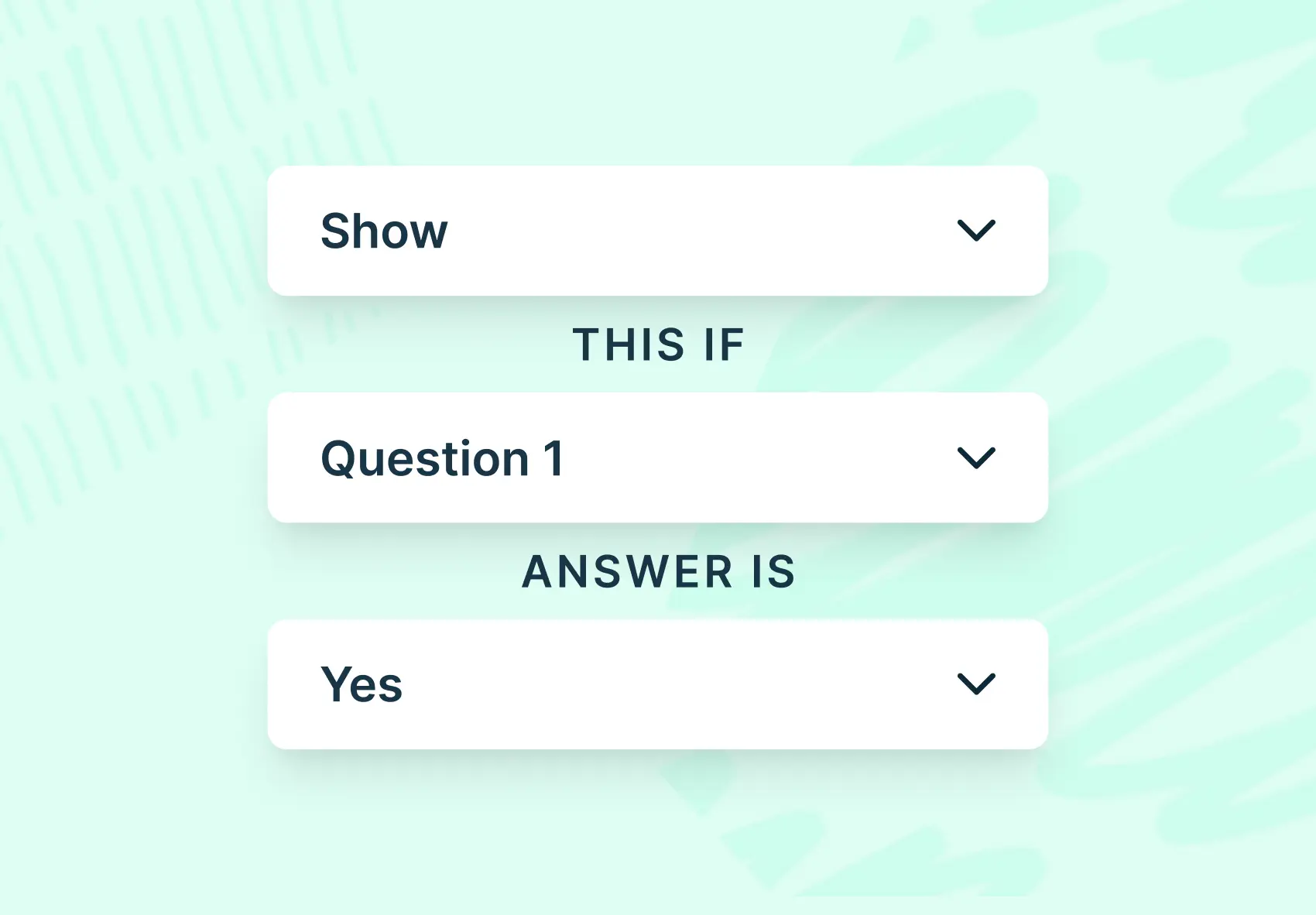
Conditional logic (also called skip logic or branching logic) transforms static surveys into dynamic experiences that adapt based on participant responses, creating personalized paths where participants only see relevant questions.
This approach solves a critical problem in user research: irrelevant questions degrade data quality. When participants encounter questions that don't apply to them, they either guess at answers, skip questions, or abandon the survey entirely.
By implementing conditional logic, you can reduce survey fatigue, improve response accuracy, and gather more actionable insights from your studies.
This guide explains how conditional logic works, why it matters for user research, and how to implement it effectively in your surveys using Lyssna's conditional logic features.
Key takeaways
Conditional logic (also called skip logic or branching logic) lets you show or hide questions based on a participant's previous answers, creating personalized survey paths that improve data quality and participant experience.
If-then statements form the foundation of conditional logic, automatically routing participants to relevant questions while skipping irrelevant ones.
Benefits include reduced survey fatigue, higher completion rates, cleaner data, and more actionable insights from your research.
Common use cases span product feedback surveys, onboarding forms, satisfaction research, and prototype testing studies.
Lyssna's conditional logic is available on Growth and Enterprise plans and can be applied to single-choice, scale, preference, and prototype tasks.
Best practices include keeping logic simple, testing thoroughly before launch, and reviewing data consistency after collection.

What is conditional logic?
Conditional logic is a survey feature that shows or hides questions based on a participant's previous answers, creating personalized paths where participants only see relevant questions.
Definition and purpose
Conditional logic (often called "skip logic" or "branching logic") lets you show or hide questions based on a participant's previous answers. Instead of sending everyone through the same path, you can create a personalized flow that makes each survey more relevant and efficient.
Think of it like a choose-your-own-adventure book for research. When a participant selects a specific answer, the survey automatically adjusts what comes next. Someone who indicates they've never used your product won't be asked detailed questions about their experience with it. They'll skip ahead to questions that actually apply to them.
The purpose is straightforward: gather better data by asking the right questions to the right people at the right time. When participants only see questions relevant to their situation, they're more likely to provide thoughtful, accurate responses rather than rushing through or abandoning the survey entirely.
Why it's essential for user research and surveys
In user research, context is everything. The insights you gather are only as valuable as the questions you ask, and asking irrelevant questions doesn't just waste time. It actively degrades your data quality.
Consider a product feedback survey where you ask users about their experience with a mobile app. If someone indicates they only use the desktop version, showing them questions about mobile-specific features creates confusion and frustration. They might guess at answers, skip questions, or abandon the survey altogether. None of these outcomes help you understand your users better.
Conditional logic solves this by ensuring every question a participant sees is genuinely applicable to their experience. This approach:
Respects participant time by eliminating irrelevant questions.
Reduces cognitive load so participants can focus on thoughtful answers.
Improves data accuracy by preventing forced responses to inapplicable questions.
Increases completion rates by keeping surveys focused and manageable.
Enables deeper exploration of specific user segments without lengthening the overall survey.
For UX researchers, product managers, and marketers who need to validate concepts and gather feedback from real users, conditional logic isn't just a nice-to-have feature. It's fundamental to collecting insights you can actually trust and act on.
How conditional logic works
Understanding the mechanics of conditional logic helps you design more effective surveys. The concept is simple, but the applications can be surprisingly powerful when you combine conditions creatively.
If-then statements explained
Conditional logic operates on basic if-then statements, the same logical structure used in programming and everyday decision-making. If a specific condition is met, then a particular action occurs.
In survey terms, this typically looks like:
If a participant selects "Yes" to a question, then show them a follow-up question about their experience.
If a participant selects "No," then skip the follow-up and move to the next section.
If a participant rates something below 3 on a scale, then ask what could be improved.
These conditions can be based on various response types:
Response type | Example condition | Resulting action |
|---|---|---|
Single choice | Selected "iOS" | Show iOS-specific questions |
Scale rating | Rated 4 or higher | Skip to satisfaction section |
Preference test | Chose Design A | Ask about Design A's appeal |
Multiple conditions | Selected "Mobile" AND rated experience as "Difficult" | Show mobile checkout improvement questions |
The beauty of if-then logic is its flexibility. You can create simple linear paths or complex branching structures depending on your research needs.
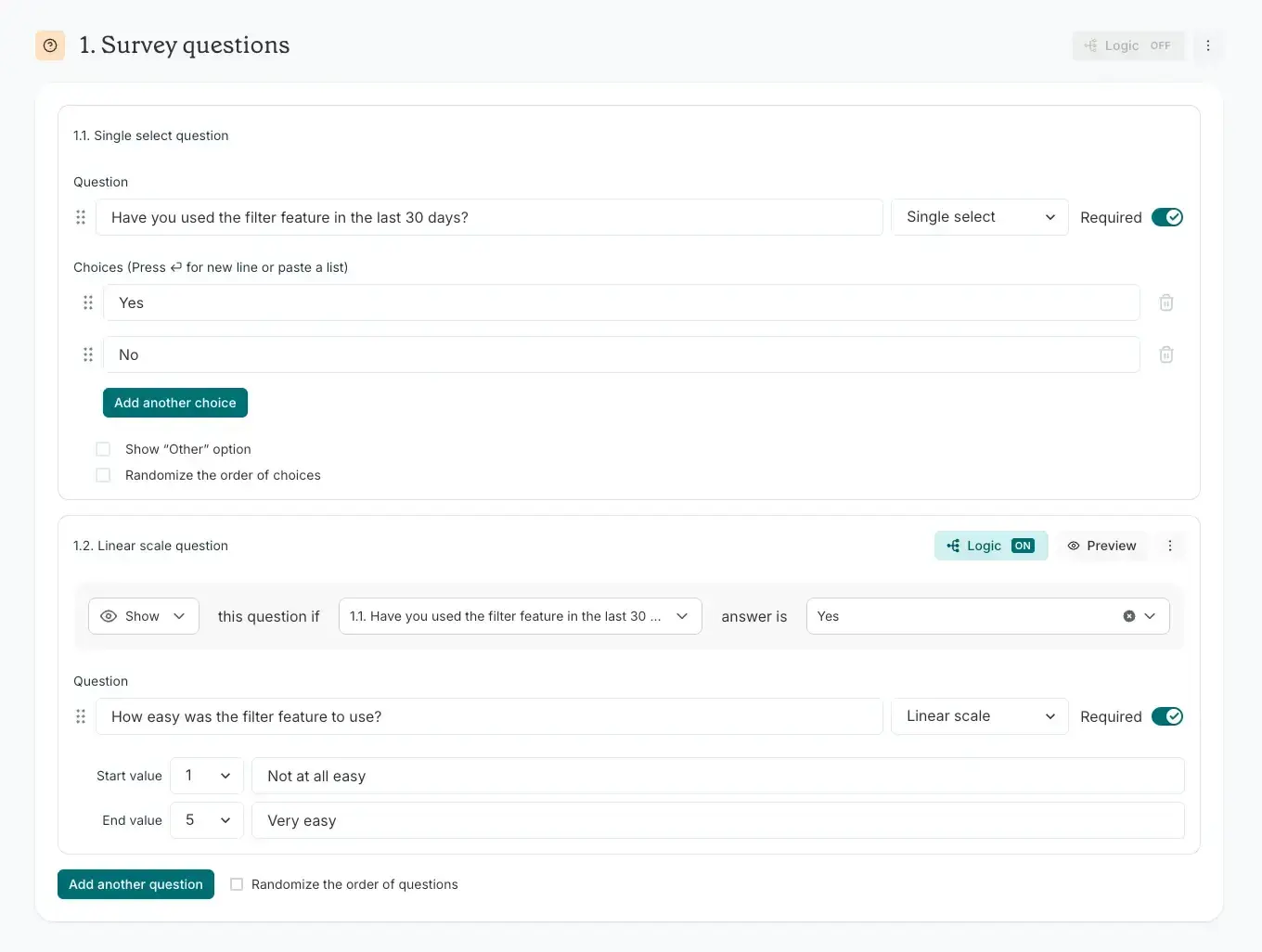
An example of applying conditional logic to a survey in Lyssna.
Examples of logic conditions in surveys
Here's how different types of conditional logic work in real research scenarios:
Logic type | What it does | Example |
|---|---|---|
Skip logic | Automatically skips irrelevant questions based on earlier answers | A participant says they don't use a streaming service, so you skip questions about subscription features entirely |
Branch logic | Sends participants down different paths depending on their responses | Someone selects "iOS" vs. "Android" in a setup test, and you show them platform-specific usability questions |
Smart logic | Applies multiple conditions to determine what a participant sees next | You show a mobile checkout task flow only if a participant selected "mobile" as their primary shopping method AND rated the existing experience as difficult |
This kind of logic keeps surveys relevant, short, and focused, while letting you dig deeper where it matters most.

Practitioner insight: "Previously, a lot of UX tools would only let you run one study type at a time – Lyssna changed the game here. Being able to run a card sort and a tree test or first click task within a single study helps to get to navigation insights much quicker at a lower cost than trying to do all of these separately."
– Verified User in Hospitality
How branching improves data quality
When surveys adapt to show only the most relevant questions, your data becomes cleaner and more targeted. You avoid noise from participants answering questions that don't apply to them, which helps eliminate filler responses, reduces guessing, and uncovers richer patterns in participant behavior.
Consider the difference between these two scenarios:
Scenario | What happens | Data impact |
|---|---|---|
Without conditional logic | A participant who doesn't use your mobile app is asked to rate their mobile experience | They skip the question (creating gaps), select "N/A" (requiring extra analysis), or guess (introducing inaccurate data) |
With conditional logic | The same participant never sees the mobile experience question | Your data only includes responses from people with actual mobile experience, making every data point meaningful |
This improvement in data quality compounds across your entire survey. When every question is relevant to every participant who sees it, you can trust your findings more and spend less time cleaning and qualifying your data during analysis.
Benefits of using conditional logic
The advantages of conditional logic extend beyond just better data. When implemented thoughtfully, it transforms the entire research experience for both you and your participants.
Personalized user experiences
When participants are only shown questions that apply to them, the survey feels easier to complete. They don't have to waste mental energy filtering out irrelevant questions. This lowers cognitive load and creates a smoother, more intuitive experience.
Personalization also signals respect. When a survey clearly adapts to a participant's situation, it communicates that you value their time and input. This positive experience can improve their perception of your brand and increase their willingness to participate in future research.
Conditional logic enables adaptive interfaces where the experience shifts in real time based on what a participant does or says. This mimics real-world interactivity and gives you a better sense of how people move through complex experiences, providing valuable insight for designing better products.
Shorter, more relevant surveys
Lengthy, irrelevant surveys are a fast track to drop-offs. Conditional logic helps prevent this by streamlining the path each participant takes. When users feel that every question is purposeful and relevant, they're more likely to finish and less likely to abandon the test midway.
For example, a survey with 30 questions might only show 15–20 to any individual participant when conditional logic is properly implemented. The survey feels shorter and more focused, even though you're still collecting comprehensive data across your entire participant pool.
This efficiency benefits everyone:
Participants spend less time on surveys that respect their attention.
Researchers get higher completion rates and more complete datasets.
Organizations can run more studies with the same participant pool without causing survey fatigue.
Practitioner insight: “Lyssna's speed allows us to keep momentum and iterate quickly – we often get useful results within minutes."
– Alice Ralph, Lead Product Designer at Goosechase
Higher response accuracy and engagement
When every question feels relevant, participants engage more thoughtfully with each one. They're not rushing through to reach the end or mentally checking out because they're bored or confused by inapplicable questions.
This engagement translates directly to data quality. Participants who feel respected and engaged:
Provide more detailed open-ended responses.
Consider their answers more carefully on rating scales.
Are more likely to complete the entire survey.
Give more accurate information about their actual behaviors and preferences.
Conditional logic helps you collect better data, faster. Over multiple studies, this adds up to significant time savings, smoother workflows, and faster decision-making.
Common use cases for conditional logic
Conditional logic proves valuable across virtually every type of user research. Here are some of the most impactful applications.
Product feedback surveys
Product feedback surveys often need to address users with vastly different experiences, from power users who've explored every feature to newcomers who've barely scratched the surface.
Example implementation: Begin by asking users whether they've used a specific feature. Using logic, you can then tailor follow-up questions based on their response.
User type | Sample follow-up questions |
|---|---|
Has used the feature | How often do you use this feature? What tasks do you typically accomplish with it? What improvements would make it more useful? |
Hasn't used the feature | Were you aware this feature existed? What prevented you from trying it? What would make you more likely to use it? |
This approach gives you actionable insights from both groups without forcing anyone to answer questions that don't apply to their experience.
Onboarding and satisfaction forms
Onboarding surveys benefit enormously from conditional logic because new users have such varied starting points. Some arrive with extensive experience in similar products, while others are complete beginners.
Example implementation: Ask new users about their prior experience with similar tools. Based on their response:
Experienced users see questions about how your product compares to alternatives and what features they're looking for.
Beginners see questions about their learning goals and what support resources would be most helpful.
For satisfaction surveys, conditional logic helps you understand the "why" behind ratings. If someone rates their experience poorly, you can immediately ask what went wrong. If they rate it highly, you can ask what's working well. This targeted follow-up provides context that makes satisfaction scores actionable.
Prototype testing and usability studies
Prototype testing is where conditional logic really shines. You can create dynamic test flows that adapt based on how participants interact with your designs.
Example implementation: Ask follow-up questions based on which design participants choose in a preference test. After asking about streaming service subscriptions, follow up with a design survey asking those participants who subscribed what they thought of a subscription pricing page.
For usability studies, you might:
Show different task flows based on which path a participant takes through your prototype.
Ask targeted questions about specific features only if the participant actually encountered them.
Dig deeper into areas where participants struggled while skipping detailed questions about areas they navigated easily.
This approach ensures your usability insights are grounded in each participant's actual experience with your prototype, not hypothetical scenarios.
How to set up conditional logic in Lyssna
Setting up conditional logic in Lyssna is straightforward, but a few best practices will help you get the most from this powerful feature.
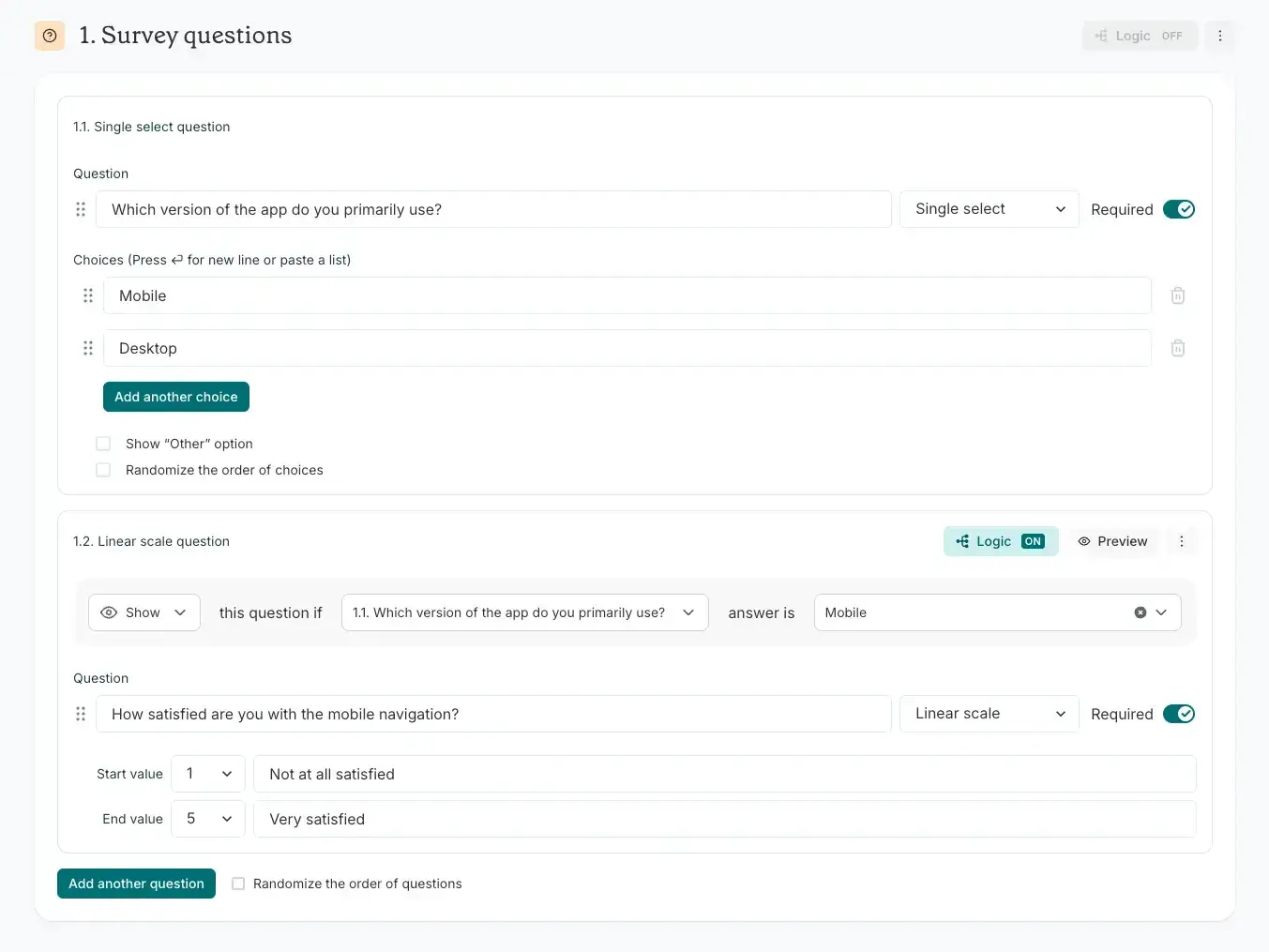
An example of applying conditional logic to a survey in Lyssna.
Step-by-step instructions
With Lyssna's logic feature, participants initially see all questions and sections, but what they see can change based on applied conditions. Here's how to implement it:
Toggle on conditional logic on the question or section where you want the branching to occur.
Define the circumstances in which participants will or won't be shown the upcoming question or section.
Add in your question and be sure to save and preview before recruiting participants.
Lyssna's conditional logic is available on Growth and Enterprise plans and can be applied to single-choice, scale, preference, and prototype tasks.

Pro tip: Use mandatory questions to your advantage. If you choose not to make a question mandatory and the participant skips it, their journey is stalled and they won't see further conditional questions. By making the question mandatory, you ensure you don't miss out on important conditional follow-up insights.
Tips for testing your survey logic
Before launching your study, thorough testing prevents frustrating issues that could compromise your data:
Testing step | What to do |
|---|---|
Preview every path | Walk through your survey as if you were different types of participants. Select different answers to ensure each branch works as intended. |
Test edge cases | Consider unusual response combinations. What happens if someone selects an unexpected answer? Does the logic still route them appropriately? |
Check for dead ends | Make sure every logical path leads somewhere meaningful. Participants shouldn't hit unexpected endings or confusing questions. |
Verify question visibility | Confirm that questions hidden by conditional logic are actually hidden, and that revealed questions appear at the right time. |
Review participant experience | Time yourself completing the survey along each major path. Are any paths significantly longer than others? Does the flow feel natural? |
Avoiding common setup errors
Even experienced researchers occasionally make these mistakes when setting up conditional logic:
Common error | Why it happens | How to avoid it |
|---|---|---|
Circular logic | Conditions that reference each other, creating loops | Map out your logic flow before building |
Orphaned questions | Questions that no logic path leads to | Test every possible path through your survey |
Conflicting conditions | Multiple conditions that can't both be true | Review conditions for logical consistency |
Over-complicated branching | Too many conditions making the survey hard to maintain | Start simple and add complexity only when necessary |
Untested paths | Assuming logic works without verification | Always preview and test before launching |
Best practices for conditional logic
Following these best practices will help you create surveys that are both powerful and maintainable.
Keep logic simple and clear
The most effective conditional logic is often the simplest. While it's tempting to create elaborate branching structures that account for every possible scenario, complexity introduces risk and makes surveys harder to maintain.
Start with your research questions: What do you actually need to learn? Design your logic to answer those questions, not to demonstrate technical sophistication.
Use the minimum necessary conditions: If a simple skip accomplishes your goal, don't build a complex multi-condition branch. Save advanced logic for situations that truly require it.
Document your logic: Create a simple flowchart or written description of your branching structure. This helps you troubleshoot issues and makes it easier for teammates to understand and modify the survey.
Consider maintenance: Will you need to update this survey in the future? Simpler logic is easier to modify without introducing errors.
Test before launching
Testing isn't optional. It's essential. Even simple conditional logic can behave unexpectedly if there's a configuration error.
Create a testing protocol: Develop a checklist of paths to test and conditions to verify. Don't rely on memory or intuition.
Involve others: Have a colleague test your survey without explaining the logic. Fresh eyes often catch issues you've become blind to.
Test with realistic responses: Don't just click through quickly. Take time to provide realistic answers and see how the survey responds.
Verify data collection: Run a few test responses and check that the data is being captured correctly, including which questions each test participant saw.
Review data consistency
After collecting responses, review your data to ensure the conditional logic worked as intended:
Check for impossible combinations: If your logic should prevent certain answer combinations, verify they don't appear in your data.
Review completion patterns: Do completion rates differ significantly across different logic paths? Unexpected patterns might indicate logic issues.
Analyze response quality: Are responses to conditional questions as thoughtful as responses to universal questions? Poor quality might suggest the logic isn't routing participants appropriately.
Look for missing data: Unexpected gaps in your data might indicate logic paths that inadvertently skip important questions.
How Lyssna helps you build smarter surveys
Lyssna provides an integrated platform that makes implementing conditional logic straightforward while supporting your broader research goals.
With Lyssna, you can:
Apply conditional logic to single-choice, scale, preference, and prototype tasks.
Combine conditional logic with rapid testing to get results quickly.
Access a diverse participant panel to ensure your conditional paths are tested with representative users.
Integrate with tools like Figma to test prototypes.
Practitioner insight: "The other thing that I love about Lyssna is that there are so many different approaches and you can get really creative with it."
– Alan Dennis, Product Design Manager at YNAB
For teams looking to gather user insights quickly and make data-driven decisions, conditional logic is a powerful tool in your research toolkit, especially when combined with effective screener surveys to recruit the right participants.
FAQs about conditional logic

You may also like these articles