28 Sep 2023
|20 min
Design surveys guide
Use design surveys to gather considered feedback about your designs.
Design surveys help you gather user feedback quickly and validate design decisions at scale. While traditional user research methods like interviews and usability testing give you deep qualitative insights, design surveys complement these approaches by providing quantifiable data you can act on fast.
When you're working in a fast-paced product environment, you need efficient ways to understand user preferences and validate design concepts. Design surveys bridge the gap between assumptions and evidence, giving you the information to make confident, data-driven decisions.
In this guide, you'll learn:
What design surveys can (and can't) tell you about your users
How to create effective surveys that get reliable results
Best practices for analyzing responses and applying insights to your design work
Whether you're a UX researcher, product designer, or product manager, design surveys can strengthen your research toolkit and help you move faster without sacrificing quality.
Key takeaways
Design surveys gather quantifiable user feedback at scale – helping you validate design decisions, measure sentiment, and identify pain points faster than moderated testing alone.
You can test first impressions, preferences, expectations, and usability perceptions across any visual element from logos to complete page layouts.
Effective surveys stay focused with 5-10 questions, mix closed-ended (for metrics) and open-ended questions (for detailed insights), and use neutral language to avoid bias.
Combine surveys with other methods like preference testing, five second testing, or first click testing to get both quantitative data and rich behavioral insights.
The right tool makes the difference – look for platforms that show designs in context, offer diverse participant recruitment, and provide easy analysis of results.
5 benefits of design surveys for UX feedback
Design surveys offer unique advantages that make them essential for product and UX teams. Here's how they can strengthen your research approach.
Benefit | What you get | Best for |
|---|---|---|
Capture direct user feedback | Unfiltered opinions on what users think and feel about your designs | Testing messaging, capturing first impressions, understanding sentiment |
Validate design decisions | Quantifiable data to confirm design choices meet user expectations | Choosing between design options, backing up recommendations with evidence |
Identify user needs and pain points | Insights into what users value most and where they experience friction | Early-stage design, defining requirements, prioritizing features |
Quantify sentiment | Measurable data on how widespread opinions are and how strongly users feel | Prioritizing improvements, tracking changes over time, demonstrating impact |
Cost-effective and scalable | Reach hundreds of users quickly without the cost of moderated testing | Fast development cycles, distributed audiences, limited research budgets |
Capture direct user feedback
Surveys let you collect opinions and impressions directly from your target audience. Unlike analytics that show what users do, surveys reveal what users think and feel about their experience.
You can use surveys to:
Test whether your messaging resonates (like pricing pages or landing page copy)
Capture first impressions and emotional responses to new designs
Understand user sentiment in their own words
This direct feedback helps you identify where your design might not align with user expectations, giving you concrete direction for improvements.
Validate design decisions
Surveys give you quantifiable data to confirm whether your design choices meet user expectations. This is especially valuable when you're choosing between different options or need to back up recommendations with evidence.
Use surveys to test:
Layout alternatives
Color scheme preferences
Icon and visual element choices
Navigation structures
You can mix survey question formats (multiple-choice, ranking, linear scales, open text) to understand not just what users prefer, but why they prefer it.
Identify user needs and pain points
Surveys help you uncover what users value most and where they experience friction. By asking targeted questions about goals, frustrations, and priorities, you can spot opportunities to better serve your audience.
This insight is particularly valuable early in the design process when you're defining requirements and identifying key use cases. Surveys show you which features matter most, what tasks users want to accomplish, and where they hit obstacles.
Because surveys scale easily, you can gather feedback from a large, diverse group and feel confident your insights represent your broader user base.
Quantify sentiment
Surveys add a quantitative dimension to your qualitative research, helping you understand how widespread user opinions are and how strongly people feel about them.
This quantification helps you prioritize design improvements and demonstrate impact to stakeholders. When you can show specific patterns in user feedback, you have compelling evidence to guide decisions.
You can also track sentiment changes over time, measuring the effectiveness of design improvements and catching emerging issues early.
Cost-effective and scalable
Surveys reach larger groups quickly and affordably compared to moderated testing. While user interviews require significant time investment per participant, surveys can gather feedback from hundreds of users efficiently.
This scalability makes surveys valuable when you need to:
Validate findings across different user segments
Test multiple design variations
Gather feedback from geographically distributed users
Incorporate user feedback into fast development cycles
Surveys make user feedback accessible to teams with limited research budgets, enabling more evidence-driven design decisions across organizations of all sizes.

Practitioner insight
"I appreciate that the feedback (from Lyssna) is super quick and affordable. And I like the variety of tests/polls I can run. In recent years, they added more filters, which I like, such as hobbies, technology use, financial products, etc to better target the right respondents."
What can you learn from design surveys?
Design surveys reveal specific feedback that’s difficult to capture through other methods. Here's what you can uncover.
What you're testing | What you learn | Example questions |
|---|---|---|
First impressions | Whether your messaging, branding, and visual hierarchy are immediately clear | "What do you think this product does?" "How would you describe this to a friend?" |
Preferences | Which design variations users prefer and why | "Which layout feels easier to navigate?" "Which color scheme best represents our brand?" |
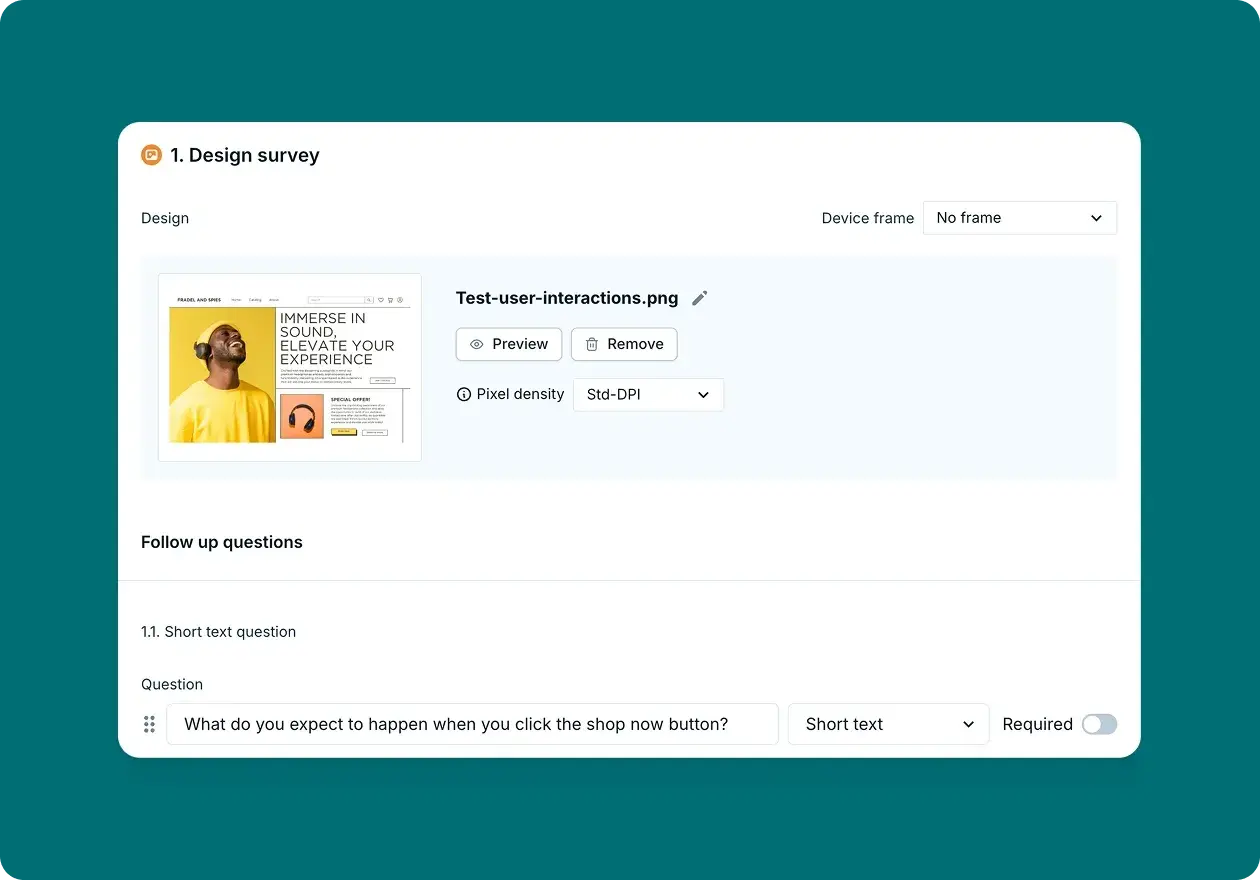
Expectations vs reality | Mismatches between what users expect and what your design actually does | "What would you expect to happen if you clicked this button?" "What information do you expect to find here?" |
Usability perception | Whether users find your design intuitive, trustworthy, or frustrating | "How easy or difficult does this look to use?" "How would you rate your confidence in completing this task?" |
First impressions
Surveys capture immediate reactions before they're influenced by extended interaction with your product. You can test whether users quickly understand what your product does, whether your value proposition is clear, and whether your visual design communicates the right brand attributes.
Use first impression testing to:
Check if your home page clearly explains your product's purpose
Test whether animations or videos grab attention and maintain engagement
Validate that your design communicates the right brand qualities (trustworthy, modern, professional)
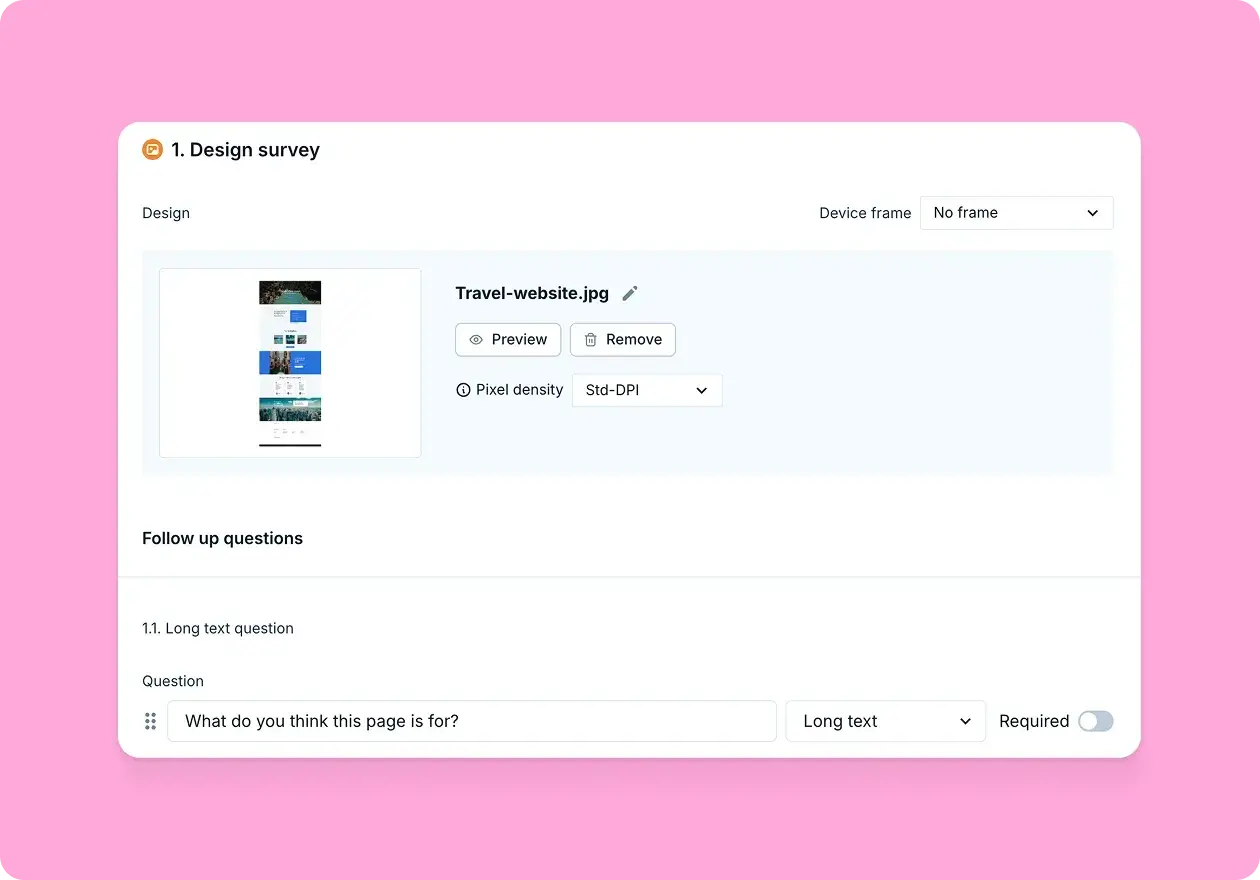
Questions like "What do you think this website is for?" or "How would you describe this product to a friend?" reveal whether your design successfully communicates its intended message from the first moment users encounter it.
Preferences
You can test everything from high-level layout decisions to specific UI elements like button styles, color palettes, or typography choices.

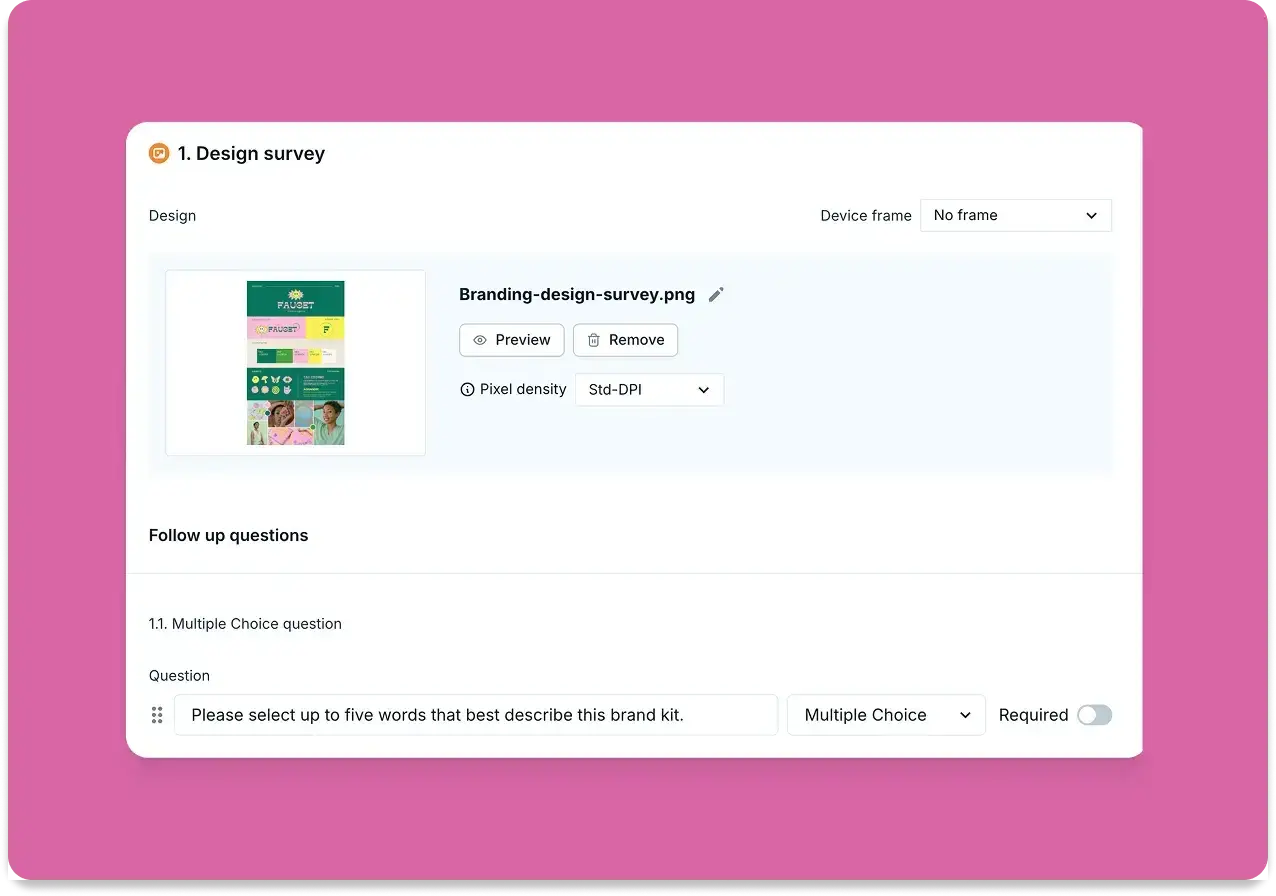
Pro tip: In Lyssna, design surveys let participants view your design, watch your video, or listen to your audio as they answer questions, giving their feedback immediate context. This ensures preferences are based on actual exposure to your designs rather than abstract descriptions.
Test preferences for:
Layout and navigation structures
Color schemes and visual styles
Icon sets and imagery
Typography and content hierarchy
Understanding user preferences helps you create designs that resonate more strongly with your target audience.
Expectations vs reality
Surveys reveal when users expect something different from what your design actually delivers. This insight is crucial for preventing frustration and ensuring your design aligns with user mental models.
Identify gaps where:
Users expect elements to be interactive that aren't
Users misunderstand the purpose of specific features
Your design suggests capabilities that don't exist
By catching these mismatches early, you can adjust your design to better align with expectations or provide clearer communication about how your product works.
Usability perception
Perceived usability often matters as much as actual usability. Users' confidence in a design affects their willingness to engage with it.
Surveys measure subjective qualities like trustworthiness, professionalism, ease of use, and aesthetic appeal. This feedback helps you understand not just whether users can complete tasks, but whether they feel confident and comfortable doing so.
This is particularly valuable for designs where trust and credibility matter, such as financial services, healthcare applications, or ecommerce platforms.
Our demo video below goes into more detail about what design surveys are and how to craft them effectively.
8 steps to create an effective design survey
Follow these steps to design surveys that provide valuable, actionable feedback for your design decisions.
Step | What to do | Why it matters |
|---|---|---|
1. Define your goal | Decide what you want to measure (trust, clarity, aesthetics) | Keeps your questions focused and results actionable |
2. Choose the right audience | Recruit participants that match your personas | Ensures feedback comes from people who represent your actual users |
3. Pick the right survey tool | Select platforms like Lyssna that support design testing | Makes it easier to show designs in context and gather quality feedback |
4. Keep it short | Limit to 5–10 focused questions | Higher completion rates and more thoughtful responses |
5. Mix question types | Use both closed-ended and open-ended questions | Provides quantifiable data and rich qualitative insights |
6. Avoid leading questions | Ensure neutrality to prevent bias | Gets you genuine user opinions, not influenced responses |
7. Pilot test the survey | Test on a small group first | Identifies confusing questions and technical issues before launch |
8. Analyze and act on results | Turn survey data into design improvements | Ensures your insights lead to actual changes, not just data collection |
Step 1: Define your goal
Start by asking yourself: What do I need to learn from this survey? Your goal should be specific and measurable.
Instead of: "Get feedback on the design"
Try: "Determine whether users understand the checkout process" or "Measure user preference between two homepage layouts"
Clear goals help you choose the right questions, select appropriate participants, and analyze results effectively. Document your goals before writing questions, and refer back to them throughout the process to ensure every question serves your research objectives.
Step 2: Choose the right audience
The quality of your insights depends on getting feedback from the right people – those who represent your actual or intended users.
Consider targeting based on:
Demographics: Age, location, income level
Behavioral characteristics: How they use similar products
Experience level: Beginners vs. experts
Role or job function: For B2B products
Device preferences: Mobile vs. desktop users
Use screener surveys to ensure you're recruiting participants who match your target audience. If you're testing a mobile banking app, you want feedback from people who actually use mobile banking, not just anyone with a smartphone.
Pro tip: Lyssna provides access to a diverse participant panel with detailed targeting across 395+ attributes, ensuring your survey results reflect the perspectives of users who will actually interact with your design.
Step 3: Pick the right survey tool
The right survey tool makes the difference between superficial feedback and deep, contextual insights about your designs.
Look for platforms that offer:
Visual survey capabilities (images, prototypes, videos)
Multiple survey question types (scales, multiple choice, open-ended)
Participant recruitment services
Advanced targeting options
Easy analysis and reporting tools
Integration with design tools
Pro tip: Lyssna lets you upload high-quality visuals, videos, or audio to keep your designs front and center during feedback. You can ask targeted questions with various formats and combine design surveys with other tests like five second or first click tests to get a complete picture of user responses.
Step 4: Keep it short
Limit your survey to 5–10 focused questions for higher completion rates. Survey fatigue is real – longer surveys result in lower completion rates and less thoughtful responses.
Each question should provide unique, actionable insights. If a question doesn't help you make a specific design decision, remove it. This discipline leads to more focused surveys that provide clearer direction.
Shorter surveys also get more honest, thoughtful responses because participants aren't rushing to finish. When you respect their time, they're more likely to provide detailed, helpful feedback.
Practitioner insight
"Easy to set up and run surveys from quick tests to full usability studies. I started using it last May, and the results have been solid. The free version is surprisingly complete. Great for validating content and copy early on before implementing it."
Step 5: Mix question types
Different question types lead to different feedback. The most effective surveys combine quantitative and qualitative approaches.
Closed-ended questions give you:
Quantifiable data for comparison
Easy analysis and reporting
Clear metrics for decision-making
Ability to track changes over time
Open-ended questions give you:
Rich, detailed explanations
Unexpected insights and ideas
Context for quantitative findings
User language and terminology
A well-balanced survey might include rating scales to measure satisfaction, multiple-choice questions to understand behavior, and open-ended questions to capture detailed feedback and suggestions.
Step 6: Avoid leading questions
Leading questions skew your results by suggesting the "right" answer or influencing how participants think about your design.
Examples of neutral phrasing:
Instead of: "Doesn't this layout feel intuitive?"
Ask: "How easy is it to navigate this layout?"Instead of: "What do you love about this design?"
Ask: "What are your thoughts on this design?"Instead of: "How much better is Design A than Design B?"
Ask: "How do you compare these two designs?"
Neutral questions produce more reliable data and help you uncover genuine user opinions rather than responses influenced by your expectations.
Step 7: Pilot test the survey
Before sending your survey out, test it with a small group to identify confusing questions and technical issues.
Pilot testing helps you:
Identify unclear or confusing questions
Estimate completion time
Test technical functionality
Refine question order and flow
Ensure visual elements display correctly
Pro tip: Run your pilot test with 3-5 people who are similar to your target audience. Ask them not just to complete the survey, but to think aloud about their experience and point out any confusion or difficulties.
Step 8: Analyze and act on results
The value of your survey lies in translating responses into concrete design decisions and improvements.
Start by looking for patterns:
Which responses were most common?
Are there significant differences between user segments?
What themes emerge from open-ended responses?
Which findings have the strongest implications for your design?
Create a clear action plan based on your findings. If most users found a particular element confusing, prioritize redesigning that element. If users consistently prefer one design variation, you have clear direction for moving forward.
Document your findings and share them with your team, including specific recommendations for design changes. This ensures your survey insights translate into actual improvements rather than just interesting data points.
Practitioner insight
"Lyssna helps me and my team build easy and effective surveys and user tests that we use to improve our product's experience."
Survey design questions
Effective survey questions are the foundation of meaningful design feedback. The way you phrase questions significantly impacts the quality and usefulness of responses you receive.
Question type | What it's good for | Example |
|---|---|---|
Closed-ended (Rating scales) | Measuring preferences, satisfaction, or specific behaviors | "On a scale of 1–5, how easy was it to understand the homepage?" |
Closed-ended (Multiple choice) | Comparing options or identifying primary user goals | "Which design layout do you prefer?" |
Closed-ended (Yes/No) | Quick validation of assumptions or expectations | "Does this design meet your expectations?" |
Open-ended (First impressions) | Understanding immediate reactions and comprehension | "What was your first impression of this design?" |
Open-ended (Problems & improvements) | Identifying friction points and gathering suggestions | "What do you find confusing or unclear?" |
Demographic | Segmenting results by user groups | "How often do you use similar products?" |
Closed-ended questions
Closed-ended questions provide quantifiable data that's easy to analyze and compare. These questions work well for measuring preferences, satisfaction levels, and specific behaviors.
Rating scale examples:
"On a scale of 1–5, how easy was it to understand the homepage?"
"How would you rate the visual appeal of this design?" (1 = Very unappealing, 5 = Very appealing)
"How likely are you to recommend this product to a colleague?" (0-10 scale)
Multiple choice examples:
"Which design layout do you prefer?" (with visual options)
"What is your primary goal when visiting this type of website?" (with predefined options)
"Which of these words best describes this design?" (professional, creative, trustworthy, confusing)
Yes/No questions:
"Does this design meet your expectations for a financial services website?"
"Would you feel comfortable entering personal information on this page?"
"Is it clear what action you should take next?"
Closed-ended questions are particularly valuable when you need to compare options, track metrics over time, or make decisions based on clear preferences.
Open-ended questions
Open-ended questions provide rich, detailed insights that help you understand the reasoning behind user opinions and discover unexpected feedback.
First impression questions:
"What was your first impression of this design?"
"What do you think this website/app is for?"
"How would you describe this product to a friend?"
Comprehension questions:
What do you think the next step would be after seeing this screen?
How would you describe the purpose of this product?
Can you explain how you think this feature works?
Is there anything here you'd want clarified before moving forward?
Expectation questions:
Where would you click first, and why?
What would you expect this page to do if you scrolled down further?
Which part of this design do you think is most interactive?
What kind of information would you expect to find here?
Problem identification questions:
"What do you find confusing or unclear?"
"What would prevent you from completing this task?"
"What additional information would be helpful here?"
Improvement suggestions:
"How would you improve this design?"
"What's missing from this page?"
"What would make this easier to use?"
Open-ended questions often provide the most actionable insights because they reveal not just what users think, but why they think it.
Demographic questions
Demographic questions help you understand whether different user groups have different needs, preferences, or experiences with your design.
Basic demographics:
Age range
Geographic location
Gender identity
Education level
Income range
Behavioral demographics:
How often do you use [similar products/services]?
What devices do you primarily use for [relevant tasks]?
How would you describe your technical expertise?
What's your role/job title? (for B2B products)
Experience-based demographics:
How long have you been using [product category]?
Which [competitors/alternatives] have you used?
How familiar are you with [specific features/concepts]?
Keep demographic questions at the end of your survey when possible, as they can feel intrusive if asked upfront. Only ask for demographic information that you'll actually use to segment and analyze your results.
7 tips for effective design surveys
These best practices help you maximize the effectiveness of your design surveys and gather high-quality, actionable feedback.
Tip | What to do | Why it matters |
|---|---|---|
Start with clear objectives | Focus on specific design elements, not generic feedback | Helps you write better questions and act on findings |
Use simple language | Avoid jargon and keep questions short and direct | Prevents misinterpretation and gets clearer answers |
Limit to essential questions | Only include questions that inform specific design decisions | Increases completion rates and response quality |
Randomize options | Present choices in different orders to different participants | Reduces order bias in multiple-choice questions |
Add visuals | Show screenshots, mockups, or prototypes | Ensures feedback is based on actual designs, not assumptions |
Incentivize participation | Offer small rewards proportional to time commitment | Boosts completion rates and engagement |
Follow up with qualitative testing | Combine surveys with usability tests and interviews | Provides richer insights and validates findings |
Start with clear objectives
The most effective design surveys have laser-focused objectives that address specific design decisions or validate particular aspects of your user experience.
Instead of: "What do you think of our website?"
Focus on:
Testing a particular user flow or feature
Validating a specific design decision
Comparing two distinct design alternatives
Measuring one key aspect like trustworthiness or clarity
Clear objectives help you write better questions, recruit the right participants, and analyze results more effectively. They also make it easier to act on your findings because you know exactly what design decisions the survey is meant to inform.
Use simple language
Keep questions clear and concise. Avoid overwhelming participants with long, complicated questions that could be misinterpreted.
Avoid:
Industry jargon or technical terms
Complex sentence structures
Multiple concepts in one question
Ambiguous words that could be interpreted differently
Instead, use:
Everyday language your users understand
Short, direct sentences
One concept per question
Specific, concrete terms
Test your questions with colleagues or friends who aren't familiar with your project to ensure they're truly clear and understandable.
Limit to essential questions
Every question should serve a specific purpose and contribute to your research objectives. Ruthlessly eliminate "nice to know" questions in favor of "need to know" questions.
Ask yourself for each question:
Does this help me make a specific design decision?
Will the answer change how I approach the design?
Is this information available through other means?
Does this provide unique insights?
If you can't clearly articulate how a question will influence your design decisions, consider removing it. Shorter surveys get higher completion rates and more thoughtful responses.
Randomize options
When presenting multiple options, the order can influence responses. People tend to favor options presented first (primacy effect) or last (recency effect).
Randomizing the order of options ensures that position doesn't unfairly influence your results. Most survey platforms, including Lyssna, offer automatic randomization features.
This is particularly important for:
Preference testing between design alternatives
Multiple-choice questions with several options
Rating different features or elements
Comparing competing products or services
Add visuals
Design surveys are most effective when participants can see and interact with the actual designs they're evaluating. Visual context ensures feedback is based on the real design rather than participants' imagination or assumptions.
Include:
High-quality screenshots of key screens
Interactive prototypes for testing user flows
Before/after comparisons for redesign projects
Multiple angles or states of the same design
Visual surveys provide more accurate and actionable feedback because participants respond to what they actually see.
Incentivize participation
While not always necessary, incentives can significantly improve response rates and participant engagement, especially for longer surveys or when targeting busy professionals.
Effective incentives include:
Small monetary rewards (gift cards)
Entries into prize drawings
Early access to new features
Exclusive content or resources
Donation to charity on participant's behalf
The incentive should be proportional to the time commitment required. Match the reward value to the survey length and complexity.
Follow up with qualitative testing
Design surveys are most powerful when used as part of a broader research strategy that includes qualitative methods like user interviews and usability testing.
Use surveys to:
Identify issues to explore in depth through interviews
Validate findings from qualitative research at scale
Prioritize which design problems to address first
Track improvements after implementing changes
Survey logic allows you to tailor the experience based on participants' previous answers. If a participant indicates they're confused by a section, you can show follow-up questions to dig deeper. This creates a more personalized survey experience and helps you gather more relevant insights.
Get started with design surveys
Design surveys help you build user-centered products by providing direct access to user opinions, preferences, and feedback at scale. They bridge the gap between assumptions and evidence, helping you make informed design decisions based on real user insights.
The key to successful design surveys is approaching them strategically: define clear objectives, ask the right questions, recruit appropriate participants, and translate findings into actionable improvements. When done well, design surveys become a powerful tool for validating decisions, identifying user needs, and creating products that resonate with your audience.
Why use Lyssna for design surveys
Lyssna is built specifically for design research and user feedback collection, with features designed to help UX teams gather meaningful insights about their designs.
What you get with Lyssna:
Feature | What it does for you |
|---|---|
Built-in templates | Get started immediately with proven survey templates for common UX research scenarios |
Multiple testing methods | Combine surveys with preference testing, five second testing, and first click testing for complete insights |
Easy analysis tools | Visualize results with charts, filter by participant characteristics, and export data for deeper analysis |
Participant panel | Access a diverse panel with advanced targeting across 395+ attributes |
Visual context | Upload high-quality images, videos, or audio to keep designs front and center during feedback |
Move from feedback to action faster
Lyssna streamlines the entire research process, from participant recruitment to insight analysis, so you can gather user feedback quickly without sacrificing quality.
The combination of quantitative survey data and qualitative insights from other testing methods provides a complete picture of user experience, helping you make confident design decisions backed by evidence.
Whether you're validating a new design concept, choosing between alternatives, or measuring the impact of design changes, Lyssna gives you the tools and participant access you need to gather meaningful feedback at the speed of modern product development.